Chart position — tracked daily by LaunchShots
Screenshot changes — detected by LaunchShots
Screenshot style breakdown
Sampled from 6 of MOJi辞書: 日语专业学习词典's App Store screenshots — background, accent and theme, measured by LaunchShots (not something Apple publishes).
#242424 bg
#424242
#ECB47C accent
#FFFFFF text
Screenshots


iPad screenshots




Icon palette
About this app
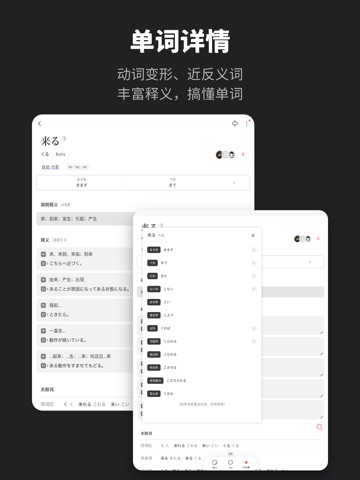
『一起学日语,渡辞海』- MOJi辞書(じしょ)是百万用户共建的日语学习词典,支持自动识别假名、汉字、罗马音输入,共收录百万详解词条。 【查词】 精准搜索:快速精准查词,确保第一个结果就是想要的 海量词库:实时更新,自创单词打造专属词库,内置离线词库无网可用 详解词条:动词活用一览,分类解析,涵盖近反义词,支持写笔记 【输入】 手写输入:简单画几笔,就可精准识别汉字假名 图片识别:提取图片中的日文并提供查词、翻译等 五十音建议:初学者输入日语更方便 【更多】 翻译:中日互译,解析句子结构,对日文注音,提取重点词汇 问答:用户共建,补充查词无法覆盖的难点 词单:单词列表由官方/全球用户创作,可收藏背词 背词:支持十多种题型,艾宾浩斯遗忘曲线复习,自由配置 辅助阅读:长文本/网页标注发音,动词原型,一键查词 小组件:桌面随机,遇见新词 收藏:打造你的专属辞书,全平台同步,数据多地备份 听单词:单词列表洗脑循环,跟读党耳机党福音 推送:定制单词推送,可选词单(如:JLPT N1词单) 【政策协议】 使用协议:https://www.k…
App details
What you can learn from MOJi辞書: 日语专业学习词典
Every shipping app on the App Store has gone through the same decisions you're working through right now: which screenshot goes first, what caption sits over it, which device frame to show, what color the background should be. The 20 screenshots above are MOJi辞書: 日语专业学习词典's answers to those questions — they're public, they're real, and they made it through Apple's review.
What the numbers say: MOJi辞書: 日语专业学习词典 runs a dark set with one background colour (#242424) carried across every screenshot — the listing reads as a single poster when the shots sit side by side in search results. The accent colour we picked up, #ECB47C, is the one to reuse for badges, arrows and highlighted words if you borrow this look. Hit Use this style to open the editor with these exact colours and drop your own screenshot in.
Notice the first screenshot in particular. It's the one users see in search results and on the product page, and it's where most apps spend their best caption and tightest design. Look at the proportion of background to phone, where the text sits, what one thing the image is trying to communicate.
Want to see how other Reference apps approach the same problem? Browse more Reference apps in the showcase.
Take what works into your own screenshots
Open LaunchShots and design your App Store & Google Play screenshots — pick a device frame, drop captions, ship in minutes. Free, in your browser.
Open the screenshot editor →Apps with a similar look
Closest background + accent colours among the listings we've analysed — useful when you want to see the same palette handled by a different team.