Chart position — tracked daily by LaunchShots
Screenshot style breakdown
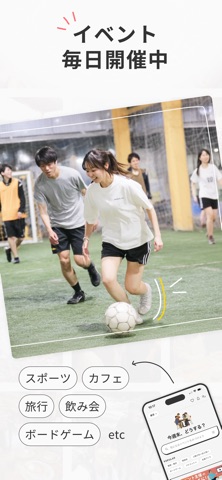
Sampled from 5 of つなげーと - 趣味友アプリ's App Store screenshots — background, accent and theme, measured by LaunchShots (not something Apple publishes).
#242424 bg
#424242
#5494B4 accent
#FFFFFF text
Screenshots



Icon palette
About this app
趣味友達が見つかる趣味コミュニティアプリ。 飲み会、カフェ会、食べ歩き、ボードゲーム、フットサル、バスケ、アウトドア、日帰り旅行など、 さまざまな趣味イベントに参加して趣味友とリアルで遊べます。 アプリでイベントを探して参加するだけ。 共通の趣味がきっかけなので、自然に会話が生まれます。 恋愛マッチングではなく、 趣味でつながる友達(趣味友)を見つけるアプリです。 社会人も学生も、誰でも気軽に参加できます。 あなたの「したいこと」で、趣味友達と会おう。 《こんな人におすすめ》 ・趣味の合う友達(趣味友)を見つけたい ・恋愛マッチングではなく、趣味の友達を作りたい ・この週末に参加できるイベントを探したい ・社会人になって友達を作る機会が減った ・仕事終わりに飲み会やカフェ会に行きたい ・上京してきて遊べる友達が少ない ・休日をもっと楽しく過ごしたい ・一人では行きにくいカフェや映画に行きたい 《趣味イベントにすぐ参加できる》 つなげーとでは、 飲み会 / カフェ会 / 食べ歩き / ボードゲーム / フット…
App details
What you can learn from つなげーと - 趣味友アプリ
Every shipping app on the App Store has gone through the same decisions you're working through right now: which screenshot goes first, what caption sits over it, which device frame to show, what color the background should be. The 5 screenshots above are つなげーと - 趣味友アプリ's answers to those questions — they're public, they're real, and they made it through Apple's review.
What the numbers say: つなげーと - 趣味友アプリ runs a mixed light-and-dark set where the background shifts from screenshot to screenshot (first shot #242424) — each image has to stand on its own, so the captions carry more of the story. The accent colour we picked up, #5494B4, is the one to reuse for badges, arrows and highlighted words if you borrow this look. Hit Use this style to open the editor with these exact colours and drop your own screenshot in.
Notice the first screenshot in particular. It's the one users see in search results and on the product page, and it's where most apps spend their best caption and tightest design. Look at the proportion of background to phone, where the text sits, what one thing the image is trying to communicate.
Want to see how other Social Networking apps approach the same problem? Browse more Social Networking apps in the showcase.
Take what works into your own screenshots
Open LaunchShots and design your App Store & Google Play screenshots — pick a device frame, drop captions, ship in minutes. Free, in your browser.
Open the screenshot editor →Apps with a similar look
Closest background + accent colours among the listings we've analysed — useful when you want to see the same palette handled by a different team.