launchshots / showcase / games / garena rov: abyssal rift

Garena RoV: Abyssal Rift

Games ★ 4.5 (1,184,574) Free 9+ 425.4 MB

Chart position — tracked daily by LaunchShots

#6 of 100
Top Free Games · Thailand
best #5 · 18 days tracked · as of Oct 9
▲ 1 / 7d

Screenshot changes — detected by LaunchShots

Oct 6, 2026
Garena RoV: Abyssal Rift added 1 iPhone screenshot (8 → 9); changed the background colour from #14141C to #242C54; changed the accent colour from #94541C to #3C4CB4; started varying the background per screenshot. →
Sep 2, 2026
Garena RoV: Abyssal Rift added 3 iPhone screenshots (5 → 8); switched from a mixed to a dark theme; changed the accent colour from #9CDCFC to #94541C; unified every screenshot on one background colour. →
Aug 25, 2026
Garena RoV: Abyssal Rift removed 3 iPhone screenshots (8 → 5); switched from a dark to a mixed theme; changed the background colour from #140C0C to #1C1454; changed the accent colour from #0C84FC to #9CDCFC. →

Screenshot style breakdown

Sampled from 6 of Garena RoV: Abyssal Rift's App Store screenshots — background, accent and theme, measured by LaunchShots (not something Apple publishes).

Use this style →
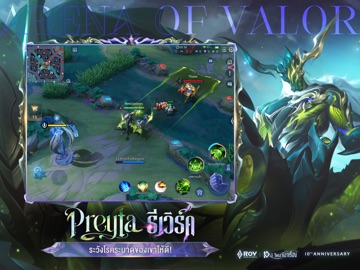
9 iPhone screenshots · 9 iPad Dark theme Background changes per screenshot
#242C54 bg #42496B #3C4CB4 accent #FFFFFF text
vs. Games apps we've analysed (1987): 18% use a light theme — Garena RoV: Abyssal Rift goes dark; 13% put the caption above the phone — Garena RoV: Abyssal Rift uses no captions; the average set has 6.3 screenshots — Garena RoV: Abyssal Rift ships 9. Full Games benchmark →

Screenshots

#1 Garena RoV: Abyssal Rift iPhone screenshot 1
#2 Garena RoV: Abyssal Rift iPhone screenshot 2
#3 Garena RoV: Abyssal Rift iPhone screenshot 3
#4 Garena RoV: Abyssal Rift iPhone screenshot 4
#5 Garena RoV: Abyssal Rift iPhone screenshot 5
#6 Garena RoV: Abyssal Rift iPhone screenshot 6
#7 Garena RoV: Abyssal Rift iPhone screenshot 7
#8 Garena RoV: Abyssal Rift iPhone screenshot 8
#9 Garena RoV: Abyssal Rift iPhone screenshot 9

iPad screenshots

#1 Garena RoV: Abyssal Rift iPad screenshot 1
#2 Garena RoV: Abyssal Rift iPad screenshot 2
#3 Garena RoV: Abyssal Rift iPad screenshot 3
#4 Garena RoV: Abyssal Rift iPad screenshot 4
#5 Garena RoV: Abyssal Rift iPad screenshot 5
#6 Garena RoV: Abyssal Rift iPad screenshot 6
#7 Garena RoV: Abyssal Rift iPad screenshot 7
#8 Garena RoV: Abyssal Rift iPad screenshot 8
#9 Garena RoV: Abyssal Rift iPad screenshot 9

Icon palette

extracting…
Dominant colors sampled from the icon — click any swatch to copy the hex.

About this app

RoV: Challenge yourself with a thrilling 5V5 MOBA experience on mobiles. With new exquisite heroes and plenty of free items, let's begin new legends of mobile eSports together now. +Teamfight Team strategy, hero counter, and picking, and strategic planning skills. Team-up and fight on the battlefield to end the game in triumph. +Hero Balance Balanced and flexible heroes allow players to adjust their plans for various situations. The fun begins from hero pick-ban to competing fairly on the battlefield. +10-Minute Game With a fast-paced game, approximately 10 minutes for each game, players can have a full MOBA experience anytime and anywhere. +Smooth Control Smooth controls for mobile MOBA system, designed and researched by world class game developers. +eSports Breathtaking competitions among Pro League champions with exceptional strategies and gameplays.

App details

Bundle ID
com.garena.game.kgth
Latest version
1.64.1.7
Released
Dec 26, 2016
Last updated
Sep 29, 2026
Languages
6 (EN, ID, ZH, TH, ZH…)
Genres
Games, Strategy, Action

What you can learn from Garena RoV: Abyssal Rift

Every shipping app on the App Store has gone through the same decisions you're working through right now: which screenshot goes first, what caption sits over it, which device frame to show, what color the background should be. The 18 screenshots above are Garena RoV: Abyssal Rift's answers to those questions — they're public, they're real, and they made it through Apple's review.

What the numbers say: Garena RoV: Abyssal Rift runs a dark set where the background shifts from screenshot to screenshot (first shot #242C54) — each image has to stand on its own, so the captions carry more of the story. The accent colour we picked up, #3C4CB4, is the one to reuse for badges, arrows and highlighted words if you borrow this look. Hit Use this style to open the editor with these exact colours and drop your own screenshot in.

Notice the first screenshot in particular. It's the one users see in search results and on the product page, and it's where most apps spend their best caption and tightest design. Look at the proportion of background to phone, where the text sits, what one thing the image is trying to communicate.

Want to see how other Games apps approach the same problem? Browse more Games apps in the showcase.

Take what works into your own screenshots

Open LaunchShots and design your App Store & Google Play screenshots — pick a device frame, drop captions, ship in minutes. Free, in your browser.

Open the screenshot editor →

Apps with a similar look

Closest background + accent colours among the listings we've analysed — useful when you want to see the same palette handled by a different team.

Portal AMFJN
#243454 #3C5CAC
Block Out! - Color Sort Puzzle
#242454 #4C44AC
JUDU
#242454 #3C5CA4
Video to MP3 Converter Master
#1C2C54 #3C64AC
القرآن العظيم | Great Quran
#24345C #4464AC
Nite - Night Video, Chat
#242464 #4C4CB4

More Games apps

Latest from the blog

ASO
Custom Product Pages vs Product Page Optimization: Which iOS Feature to Use
Oct 9, 2026
Tips
How to Avoid App Store Review Demo Account Rejection
Oct 8, 2026
Guides
Universal Links vs Deep Links on iOS: Rules for Implementation and Routing
Oct 7, 2026
News
Apple Developer Account Trader Status: Complying with EU DSA
Oct 6, 2026
1 / 1
copied