Chart position — tracked daily by LaunchShots
Screenshot changes — detected by LaunchShots
Screenshot style breakdown
Sampled from 6 of MSC for Me's App Store screenshots — background, accent and theme, measured by LaunchShots (not something Apple publishes).
#DCE4E4 bg
#C1C8C8
#04B4F4 accent
#111111 text
Screenshots


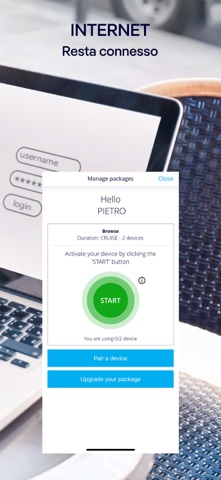

iPad screenshots


Icon palette
About this app
L'app MSC for Me migliora la tua esperienza di crociera collegandosi senza problemi ai servizi digitali a bordo, offrendoti tutto ciò di cui hai bisogno a portata di mano. È gratuita e, una volta a bordo, non è necessario alcun pacchetto internet per accedere alle sue funzionalità. PRIMA DELLA CROCIERA Inizia a pianificare la tua esperienza ancora prima di salire a bordo. Completa il check-in online in pochi passaggi e scarica la carta d'imbarco. Scatta la foto di sicurezza richiesta prima dell'imbarco. Seleziona il tuo orario di arrivo preferito al terminal. Prepara la partenza Collega la tua carta di credito alla Cruise Card in anticipo e inizia a utilizzare i servizi a bordo appena sali sulla nave. Pianifica in anticipo e risparmia Approfitta delle tariffe pre-crociera e prenota escursioni a terra, trattamenti spa, ristoranti tematici, pacchetti bevande e internet. Consulta i menu…
App details
What you can learn from MSC for Me
Every shipping app on the App Store has gone through the same decisions you're working through right now: which screenshot goes first, what caption sits over it, which device frame to show, what color the background should be. The 13 screenshots above are MSC for Me's answers to those questions — they're public, they're real, and they made it through Apple's review.
What the numbers say: MSC for Me runs a mixed light-and-dark set where the background shifts from screenshot to screenshot (first shot #DCE4E4) — each image has to stand on its own, so the captions carry more of the story. The accent colour we picked up, #04B4F4, is the one to reuse for badges, arrows and highlighted words if you borrow this look. Hit Use this style to open the editor with these exact colours and drop your own screenshot in.
Notice the first screenshot in particular. It's the one users see in search results and on the product page, and it's where most apps spend their best caption and tightest design. Look at the proportion of background to phone, where the text sits, what one thing the image is trying to communicate.
Want to see how other Travel apps approach the same problem? Browse more Travel apps in the showcase.
Take what works into your own screenshots
Open LaunchShots and design your App Store & Google Play screenshots — pick a device frame, drop captions, ship in minutes. Free, in your browser.
Open the screenshot editor →Apps with a similar look
Closest background + accent colours among the listings we've analysed — useful when you want to see the same palette handled by a different team.