Chart position — tracked daily by LaunchShots
Screenshot style breakdown
Sampled from 6 of 六法's App Store screenshots — background, accent and theme, measured by LaunchShots (not something Apple publishes).
#DCECFC bg
#C1CFDD
#0C4454 accent
#111111 text
Screenshots



iPad screenshots



Icon palette
About this app
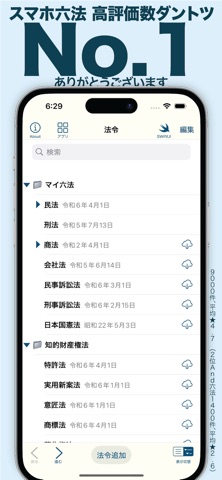
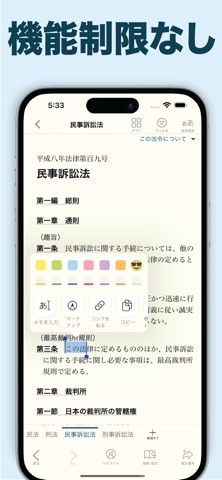
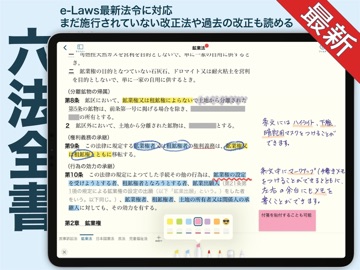
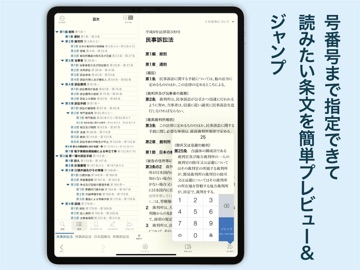
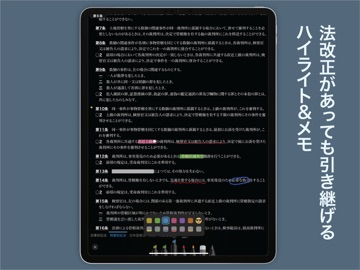
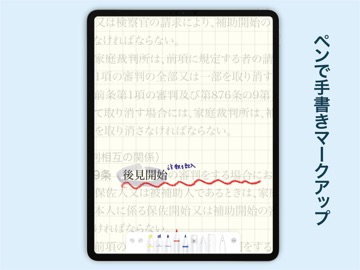
2014年に「法令ブラウザ」として公開して以来、法令制度とAppleデバイスの変化に合わせて改良を続けてきました。 「六法」は、e-Govで公開されている8,000件以上の法令を、検索し、読み比べ、書き込みながら利用できる法令閲覧アプリです。 e-Govで公開されている法令データを利用し、日本の法令8,000件以上を検索・閲覧できます。民法、刑法、商法、民事訴訟法、刑事訴訟法、行政法、税法、労働法をはじめ、憲法、法律、政令、省令、規則などを収録。法学部の学生、司法試験・資格試験の受験生から、弁護士、弁理士など法律実務に携わる方まで幅広く利用できます。 ダウンロードした法令は、通信環境のない場所でも閲覧できます。 【欲しい条文をすばやく探す】 ・法令名や全文から法令を検索 ・法令内検索 ・複数法令を横断する串刺し検索 ・条・項・号を指定してジャンプ ・目次から目的の条文へ移動 ・法令間リンクと引用元条文の表示 ・ウィジェット、Apple Watchから条文を検索 【法令を読み、比較する】 ・タブで複数の法令を切り替え ・iPadの画面分割…
App details
What you can learn from 六法
Every shipping app on the App Store has gone through the same decisions you're working through right now: which screenshot goes first, what caption sits over it, which device frame to show, what color the background should be. The 20 screenshots above are 六法's answers to those questions — they're public, they're real, and they made it through Apple's review.
What the numbers say: 六法 runs a mixed light-and-dark set where the background shifts from screenshot to screenshot (first shot #DCECFC) — each image has to stand on its own, so the captions carry more of the story. The accent colour we picked up, #0C4454, is the one to reuse for badges, arrows and highlighted words if you borrow this look. Hit Use this style to open the editor with these exact colours and drop your own screenshot in.
Notice the first screenshot in particular. It's the one users see in search results and on the product page, and it's where most apps spend their best caption and tightest design. Look at the proportion of background to phone, where the text sits, what one thing the image is trying to communicate.
Want to see how other Reference apps approach the same problem? Browse more Reference apps in the showcase.
Take what works into your own screenshots
Open LaunchShots and design your App Store & Google Play screenshots — pick a device frame, drop captions, ship in minutes. Free, in your browser.
Open the screenshot editor →Apps with a similar look
Closest background + accent colours among the listings we've analysed — useful when you want to see the same palette handled by a different team.