Chart position — tracked daily by LaunchShots
Screenshot style breakdown
Sampled from 5 of TUNAG (ツナグ)'s App Store screenshots — background, accent and theme, measured by LaunchShots (not something Apple publishes).
#1C74E4 bg
#3B87E7
#FCD44C accent
#FFFFFF text
Screenshots

iPad screenshots

Icon palette
About this app
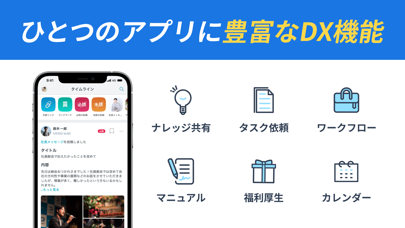
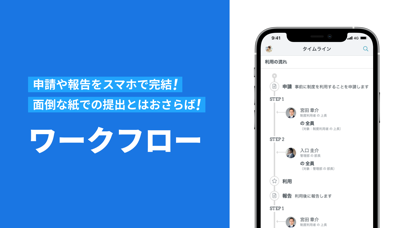
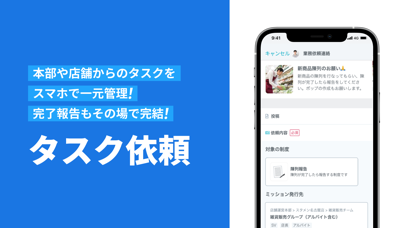
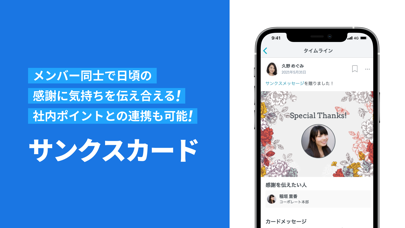
スマホひとつで組織DX、TUNAG(ツナグ)。 TUNAGはスマホひとつで企業や団体における、情報共有や業務DXを実現できるオールインワンアプリです! TUNAGにはワークフロー、タスク依頼、マニュアルなど組織のDXを加速させる機能が豊富に揃っています。 【TUNAG (ツナグ)の主な特徴・機能】 [ワークフロー] 業務申請や福利厚生の利用申請をスマホで簡単に! 面倒な紙やFAXでも申請とはおさらば! [タスク依頼] 本部や上司、同僚からのタスクを一元管理! シフト制で情報伝達が難しい職場での業務引き継ぎ、申し送りも確実に行えます! [マニュアル] テキストや動画のマニュアルをスマホで閲覧! 分からない業務があってもすぐに確認できます! [サンクスカード] 日頃の感謝を込めてメンバー同士でサンクスカードを送りあえます。 ==お問い合わせ先== 操作方法、不具合などのお問い合わせは以下のアドレスまでご連絡ください。 support@tunag.jp
App details
What you can learn from TUNAG (ツナグ)
Every shipping app on the App Store has gone through the same decisions you're working through right now: which screenshot goes first, what caption sits over it, which device frame to show, what color the background should be. The 6 screenshots above are TUNAG (ツナグ)'s answers to those questions — they're public, they're real, and they made it through Apple's review.
What the numbers say: TUNAG (ツナグ) runs a mixed light-and-dark set where the background shifts from screenshot to screenshot (first shot #1C74E4) — each image has to stand on its own, so the captions carry more of the story. The accent colour we picked up, #FCD44C, is the one to reuse for badges, arrows and highlighted words if you borrow this look. Hit Use this style to open the editor with these exact colours and drop your own screenshot in.
Notice the first screenshot in particular. It's the one users see in search results and on the product page, and it's where most apps spend their best caption and tightest design. Look at the proportion of background to phone, where the text sits, what one thing the image is trying to communicate.
Want to see how other Business apps approach the same problem? Browse more Business apps in the showcase.
Take what works into your own screenshots
Open LaunchShots and design your App Store & Google Play screenshots — pick a device frame, drop captions, ship in minutes. Free, in your browser.
Open the screenshot editor →Apps with a similar look
Closest background + accent colours among the listings we've analysed — useful when you want to see the same palette handled by a different team.