Chart position — tracked daily by LaunchShots
Screenshot changes — detected by LaunchShots
Screenshot style breakdown
Sampled from 5 of 快对AI-作业助手's App Store screenshots — background, accent and theme, measured by LaunchShots (not something Apple publishes).
#FCE444 bg
#DDC83B
#645404 accent
#111111 text
Screenshots
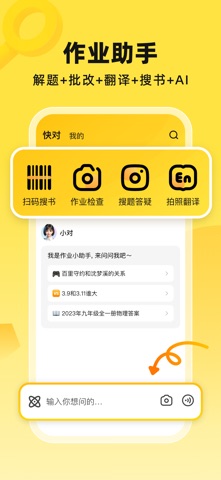
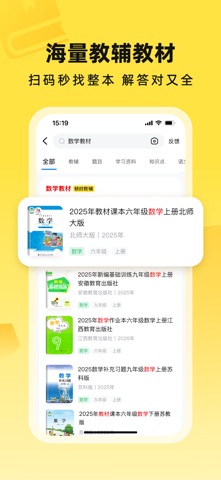


iPad screenshots


Icon palette
About this app
【快对简介】 快对致力于为上亿用户提供整本教辅教材解答、答疑解惑、AI解题、AI写作、AI搜索、AI翻译、文件扫描等服务,接入deepseek大模型,AI答疑更智能。 【家长】AI答疑解惑,视频深入讲解,错题举一反三,智能批改,秒判对错。家长的得力辅导帮手。 【学生】搜不到的题AI直接解,超详细分步讲解,轻松解决奥赛题、疑难综合题。作文一键生成,段落自由修改,字数自由定制。 【大学生】AI帮助解难题,步骤细,答案准;拍照翻译助力备考四六级;AI写作,论文学术改写、各种报告一键生成,风格字数自由定制。文件扫描,智能增强去水印,一键导出PDF。 【职场】AI写作,全文一键生成,教学教案、活动策划、发言讲话、小红书。PPT生成一键生成,模板自由定制。 【快对特点】 1、扫码速查整本教辅教材解答:覆盖小学、初中、高中、职高、中专、大学各学段的过百万本教辅教材资料,正确率高。 2、检查作业方便:学习遇到难题、家长不知作业对错时,来快对一键检查,智能批改,对错解析应有尽有。 3、智能AI解题:专研AI解题Agent,解题快,步骤细,答案准,还能举一反…
App details
What you can learn from 快对AI-作业助手
Every shipping app on the App Store has gone through the same decisions you're working through right now: which screenshot goes first, what caption sits over it, which device frame to show, what color the background should be. The 7 screenshots above are 快对AI-作业助手's answers to those questions — they're public, they're real, and they made it through Apple's review.
What the numbers say: 快对AI-作业助手 runs a light set with one background colour (#FCE444) carried across every screenshot — the listing reads as a single poster when the shots sit side by side in search results. The accent colour we picked up, #645404, is the one to reuse for badges, arrows and highlighted words if you borrow this look. Hit Use this style to open the editor with these exact colours and drop your own screenshot in.
Notice the first screenshot in particular. It's the one users see in search results and on the product page, and it's where most apps spend their best caption and tightest design. Look at the proportion of background to phone, where the text sits, what one thing the image is trying to communicate.
Want to see how other Utilities apps approach the same problem? Browse more Utilities apps in the showcase.
Take what works into your own screenshots
Open LaunchShots and design your App Store & Google Play screenshots — pick a device frame, drop captions, ship in minutes. Free, in your browser.
Open the screenshot editor →Apps with a similar look
Closest background + accent colours among the listings we've analysed — useful when you want to see the same palette handled by a different team.