launchshots / showcase / developer tools / codesnack ide: ai coding agent

CodeSnack IDE: AI Coding Agent

Developer Tools ★ 4.4 (202) Free 4+ 68.4 MB

Chart position — tracked daily by LaunchShots

#70 of 100
Top Free Developer Tools · South Africa
best #47 · 2 days tracked · as of Nov 18
▼ 23 / 7d
#77 of 100
Top Free Developer Tools · Italy
best #77 · 1 day tracked · as of Nov 2
— / 7d
#79 of 100
Top Free Developer Tools · Spain
best #79 · 1 day tracked · as of Nov 13
— / 7d
#80 of 100
Top Free Developer Tools · Saudi Arabia
best #80 · 2 days tracked · as of Nov 4
— / 7d
#81 of 100
Top Free Developer Tools · Australia
best #81 · 1 day tracked · as of Nov 9
— / 7d
+ 8 more charts

Screenshot changes — detected by LaunchShots

Oct 28, 2026
CodeSnack IDE: AI Coding Agent removed 1 iPhone screenshot (9 → 8); changed the accent colour from #1C3484 to #647C44. →
Oct 3, 2026
CodeSnack IDE: AI Coding Agent removed 1 iPhone screenshot (10 → 9); moved to captions above the phone (was full-bleed screens without captions); changed the background colour from #047CFC to #141414. →
Aug 25, 2026
CodeSnack IDE: AI Coding Agent replaced the screenshot images (same count, theme and layout). →

Screenshot style breakdown

Sampled from 6 of CodeSnack IDE: AI Coding Agent's App Store screenshots — background, accent and theme, measured by LaunchShots (not something Apple publishes).

Use this style →
8 iPhone screenshots · 9 iPad Dark theme One background colour across the set
#14141C bg #34343B #647C44 accent #FFFFFF text

Reading the caption text from the screenshots in your browser…

vs. Developer Tools apps we've analysed (1561): 39% use a light theme — CodeSnack IDE: AI Coding Agent goes dark; 34% put the caption above the phone (same here); the average set has 5.6 screenshots — CodeSnack IDE: AI Coding Agent ships 8. Full Developer Tools benchmark →

Screenshots

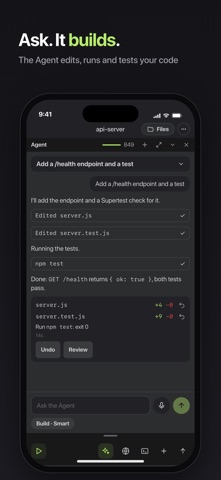
#1 CodeSnack IDE: AI Coding Agent iPhone screenshot 1
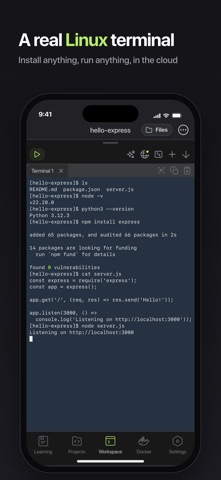
#2 CodeSnack IDE: AI Coding Agent iPhone screenshot 2
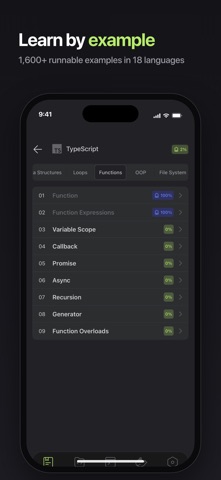
#3 CodeSnack IDE: AI Coding Agent iPhone screenshot 3
#4 CodeSnack IDE: AI Coding Agent iPhone screenshot 4
#5 CodeSnack IDE: AI Coding Agent iPhone screenshot 5
#6 CodeSnack IDE: AI Coding Agent iPhone screenshot 6
#7 CodeSnack IDE: AI Coding Agent iPhone screenshot 7
#8 CodeSnack IDE: AI Coding Agent iPhone screenshot 8

iPad screenshots

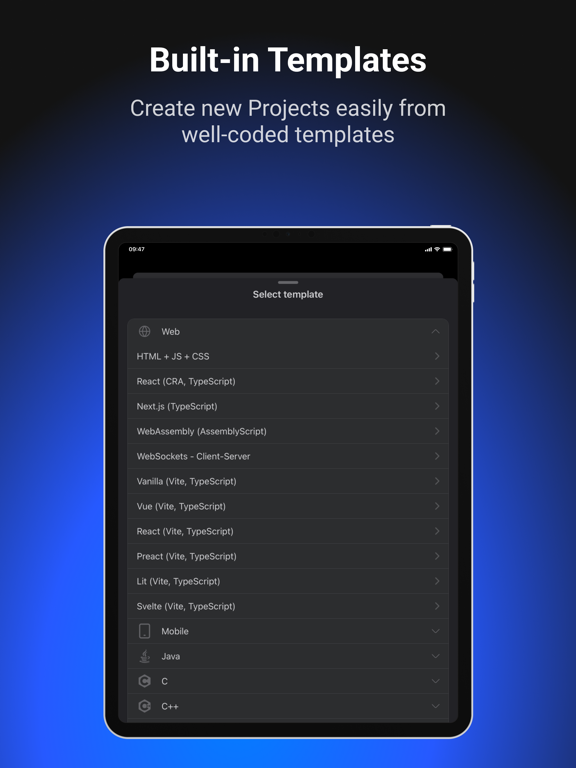
#1 CodeSnack IDE: AI Coding Agent iPad screenshot 1
#2 CodeSnack IDE: AI Coding Agent iPad screenshot 2
#3 CodeSnack IDE: AI Coding Agent iPad screenshot 3
#4 CodeSnack IDE: AI Coding Agent iPad screenshot 4
#5 CodeSnack IDE: AI Coding Agent iPad screenshot 5
#6 CodeSnack IDE: AI Coding Agent iPad screenshot 6
#7 CodeSnack IDE: AI Coding Agent iPad screenshot 7
#8 CodeSnack IDE: AI Coding Agent iPad screenshot 8
#9 CodeSnack IDE: AI Coding Agent iPad screenshot 9

Icon palette

extracting…
Dominant colors sampled from the icon — click any swatch to copy the hex.

About this app

A real IDE on your phone and tablet, with an AI Agent that works inside your own Cloud Container. Ask the Agent for a change. It edits, runs and tests. You review every step and Undo any Task. Write, run and debug in 18 languages, in a Linux terminal that installs anything. Start from a Template or an example, keep your Projects on every device. AI AGENT Describe the task. The Agent edits your files, runs the code and fixes what breaks, inside your Cloud Container, where you see every file and every command. Build does the work. Plan writes the steps first. Teach me coaches you while you write the code yourself. Hold the mic and say the task. Get a notification when a Task is done or needs you. Generate a whole Project from one description. PLAN FIRST, UNDO ANY TASK Read the plan before the Agent touches a file. Every Task is one Undo away. CODE EDITOR AND RUN Open a file, press Run…

App details

Bundle ID
com.cloud-compiler
Latest version
6.8.1
Released
Jul 30, 2018
Last updated
Oct 23, 2026
Languages
1 (EN)
Genres
Developer Tools, Education

What you can learn from CodeSnack IDE: AI Coding Agent

Every shipping app on the App Store has gone through the same decisions you're working through right now: which screenshot goes first, what caption sits over it, which device frame to show, what color the background should be. The 17 screenshots above are CodeSnack IDE: AI Coding Agent's answers to those questions — they're public, they're real, and they made it through Apple's review.

What the numbers say: CodeSnack IDE: AI Coding Agent runs a dark set with one background colour (#14141C) carried across every screenshot — the listing reads as a single poster when the shots sit side by side in search results. The accent colour we picked up, #647C44, is the one to reuse for badges, arrows and highlighted words if you borrow this look. Hit Use this style to open the editor with these exact colours and drop your own screenshot in.

Notice the first screenshot in particular. It's the one users see in search results and on the product page, and it's where most apps spend their best caption and tightest design. Look at the proportion of background to phone, where the text sits, what one thing the image is trying to communicate.

Want to see how other Developer Tools apps approach the same problem? Browse more Developer Tools apps in the showcase.

Take what works into your own screenshots

Open LaunchShots and design your App Store & Google Play screenshots — pick a device frame, drop captions, ship in minutes. Free, in your browser.

Open the screenshot editor →

Apps with a similar look

Closest background + accent colours among the listings we've analysed — useful when you want to see the same palette handled by a different team.

World Football Soccer 2026
#0C1424 #6C843C
Cal AI - Calorie Tracker
#1C1C24 #6C8444
Noor Quran: Prayer Times
#141C1C #746C44
Kommune-TV
#141414 #649444
BZZR
#141414 #64943C
Wildfire Tracker: Forest Fires
#0C0C14 #6C8454

More Developer Tools apps

Latest from the blog

Guides
Configuring Game Center in App Store Connect: Leaderboards and Achievements
Nov 22, 2026
News
Google Play Financial Features Declaration: Avoid Suspensions
Nov 21, 2026
Guides
iOS & Android App Accessibility Guide for Indie Developers
Nov 20, 2026
Tips
Implement Apple AdServices Framework: Zero-SDK Attribution
Nov 19, 2026
1 / 1
copied