Chart position — tracked daily by LaunchShots
Screenshot style breakdown
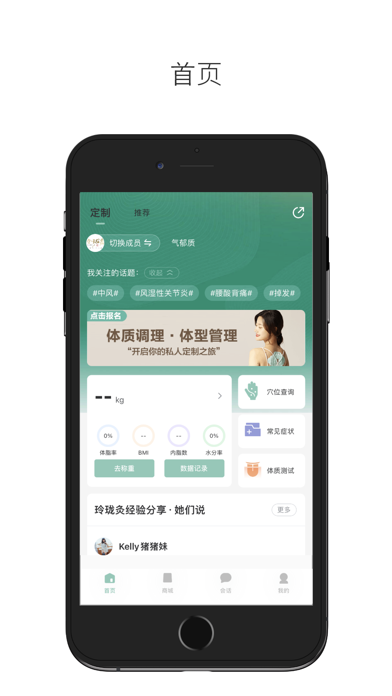
Sampled from 4 of 玲珑's App Store screenshots — background, accent and theme, measured by LaunchShots (not something Apple publishes).
#FCFCFC bg
#DDDDDD
#6CCCBC accent
#111111 text
Reading the caption text from the screenshots in your browser…
Screenshots



Icon palette
About this app
玲珑是由上海璟沁生物科技有限公司推出的健康养生类App,是国内首款针对不同体质进行改善、提高综合性分析App,对照不同人群进行25项体脂数据分析,达到真正的体质养生! 免责声明: -「玲珑秤-健康报告各项数据」不适用于医疗用途。它仅用于参考目的,是一般身体信息的来源。 -「玲珑灸」所提供的调理方案仅供参考,用户若患有疾病、长期服药或其他可能会影响健康方案执行的,应当根据自身的健康状况自行评估,必要时需在医生或其他医务人员的指导下进行。玲珑灸提供的任何方案,均不能代替医生和其他医务人员的诊断和建议,玲珑灸也不会提供任何医疗诊断或医疗建议,用户应当理性对待,若用户对其自身健康状况评估错误或对玲珑灸的方案判断错误的,应当自行承担相应的后果,玲珑灸不对用户作任何类型的担保,也不承担任何责任。
App details
What you can learn from 玲珑
Every shipping app on the App Store has gone through the same decisions you're working through right now: which screenshot goes first, what caption sits over it, which device frame to show, what color the background should be. The 4 screenshots above are 玲珑's answers to those questions — they're public, they're real, and they made it through Apple's review.
What the numbers say: 玲珑 runs a light set with one background colour (#FCFCFC) carried across every screenshot — the listing reads as a single poster when the shots sit side by side in search results. The accent colour we picked up, #6CCCBC, is the one to reuse for badges, arrows and highlighted words if you borrow this look. Hit Use this style to open the editor with these exact colours and drop your own screenshot in.
Notice the first screenshot in particular. It's the one users see in search results and on the product page, and it's where most apps spend their best caption and tightest design. Look at the proportion of background to phone, where the text sits, what one thing the image is trying to communicate.
Want to see how other Health & Fitness apps approach the same problem? Browse more Health & Fitness apps in the showcase.
Take what works into your own screenshots
Open LaunchShots and design your App Store & Google Play screenshots — pick a device frame, drop captions, ship in minutes. Free, in your browser.
Open the screenshot editor →Apps with a similar look
Closest background + accent colours among the listings we've analysed — useful when you want to see the same palette handled by a different team.