Chart position — tracked daily by LaunchShots
Screenshot style breakdown
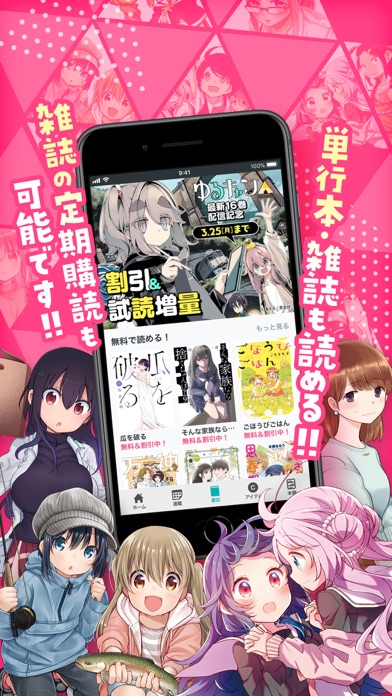
Sampled from 6 of マンガならコミックFUZ!人気漫画が毎日読めるマンガアプリ's App Store screenshots — background, accent and theme, measured by LaunchShots (not something Apple publishes).
#FC4484 bg
#FC5E95
#9C3464 accent
#FFFFFF text
Screenshots




iPad screenshots


Icon palette
About this app
COMIC FUZオリジナル漫画や『まんがタイムきらら』『週刊漫画TIMES』など雑誌連載中のマンガが楽しめる芳文社公式のまんがアプリ! ■こんな方におすすめ! ・他のまんがアプリでは読めない作品を読みたい ・無料で読める漫画アプリを探している ・単行本、雑誌を購入して読み返したい ・好きな作家さんを応援したい ・4コマ漫画が好き ・「きらら系」の作品が好き ・ちょっと大人なストーリー系マンガが読みたい ■COMIC FUZオリジナル作品連載中! 【作品例】 ・ゆるキャン△ ・へやキャン△ ・親友の娘に迫られ困っています ・Lv1魔王とワンルーム勇者 ・和服な上司がいとおしい ・きららファンタジア ・女子校だからセーフ ・城下町のダンデライオン ・百合SMでふたりの気持ちはつながりますか? ・ひめちゃんは重い女 ・荒神兄弟の復讐 …その他多数! ■アニメ化・ドラマ化作品も多数掲載! ・ご注文はうさぎですか? ・恋する小惑星 ・三者三葉 ・あっちこっち ・まちカドまぞく ・がっこうぐらし! ・けいおん! ・キルミーベイベー ・幸福グラフィ…
App details
What you can learn from マンガならコミックFUZ!人気漫画が毎日読めるマンガアプリ
Every shipping app on the App Store has gone through the same decisions you're working through right now: which screenshot goes first, what caption sits over it, which device frame to show, what color the background should be. The 10 screenshots above are マンガならコミックFUZ!人気漫画が毎日読めるマンガアプリ's answers to those questions — they're public, they're real, and they made it through Apple's review.
What the numbers say: マンガならコミックFUZ!人気漫画が毎日読めるマンガアプリ runs a mixed light-and-dark set with one background colour (#FC4484) carried across every screenshot — the listing reads as a single poster when the shots sit side by side in search results. The accent colour we picked up, #9C3464, is the one to reuse for badges, arrows and highlighted words if you borrow this look. Hit Use this style to open the editor with these exact colours and drop your own screenshot in.
Notice the first screenshot in particular. It's the one users see in search results and on the product page, and it's where most apps spend their best caption and tightest design. Look at the proportion of background to phone, where the text sits, what one thing the image is trying to communicate.
Want to see how other Book apps approach the same problem? Browse more Book apps in the showcase.
Take what works into your own screenshots
Open LaunchShots and design your App Store & Google Play screenshots — pick a device frame, drop captions, ship in minutes. Free, in your browser.
Open the screenshot editor →Apps with a similar look
Closest background + accent colours among the listings we've analysed — useful when you want to see the same palette handled by a different team.