Chart position — tracked daily by LaunchShots
Screenshot style breakdown
Sampled from 6 of Vietlott - SMS's App Store screenshots — background, accent and theme, measured by LaunchShots (not something Apple publishes).
#FCFCFC bg
#DDDDDD
#E41C2C accent
#111111 text
Screenshots



iPad screenshots


Icon palette
About this app
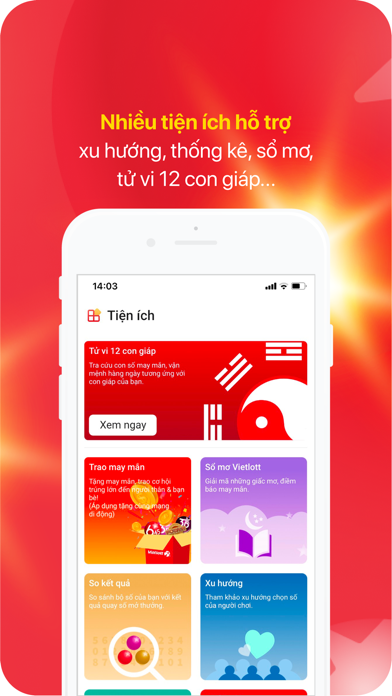
Dịch vụ mua vé trên điện thoại chính thống duy nhất của Công ty TNHH MTV Xổ số điện toán Việt Nam (Vietlott), dành cho chủ thuê bao MobiFone, VinaPhone & Viettel. - Mua vé định danh chính chủ theo giấy tờ cá nhân. - Lĩnh thưởng trực tiếp vào tài khoản, an toàn, nhanh chóng. - Hình thức thanh toán đa dạng: Hạn mức dự thưởng, Tài khoản ngân hàng, Ví điện tử. - Miễn phí nhắn tin đặt vé đến đầu số dịch vụ 9969. - Nhiều tiện ích, tính năng hấp dẫn: Xem QSMT trực tiếp, Tử vi 12 con giáp, Tặng vé, Bộ số yêu thích, Thống kê, Xu hướng,… Dịch vụ được phát triển bởi Vietlott và 3 Đại lý: MobiFone - CTIN, VNPT Media - CTIN và Viettel - VDI.
App details
What you can learn from Vietlott - SMS
Every shipping app on the App Store has gone through the same decisions you're working through right now: which screenshot goes first, what caption sits over it, which device frame to show, what color the background should be. The 14 screenshots above are Vietlott - SMS's answers to those questions — they're public, they're real, and they made it through Apple's review.
What the numbers say: Vietlott - SMS runs a mixed light-and-dark set where the background shifts from screenshot to screenshot (first shot #FCFCFC) — each image has to stand on its own, so the captions carry more of the story. The accent colour we picked up, #E41C2C, is the one to reuse for badges, arrows and highlighted words if you borrow this look. Hit Use this style to open the editor with these exact colours and drop your own screenshot in.
Notice the first screenshot in particular. It's the one users see in search results and on the product page, and it's where most apps spend their best caption and tightest design. Look at the proportion of background to phone, where the text sits, what one thing the image is trying to communicate.
Want to see how other Business apps approach the same problem? Browse more Business apps in the showcase.
Take what works into your own screenshots
Open LaunchShots and design your App Store & Google Play screenshots — pick a device frame, drop captions, ship in minutes. Free, in your browser.
Open the screenshot editor →Apps with a similar look
Closest background + accent colours among the listings we've analysed — useful when you want to see the same palette handled by a different team.