Chart position — tracked daily by LaunchShots
Screenshot changes — detected by LaunchShots
Screenshot style breakdown
Sampled from 5 of ヴァロラント Tracker - Valking.gg's App Store screenshots — background, accent and theme, measured by LaunchShots (not something Apple publishes).
#1C2C4C bg
#3B4965
#5CCCAC accent
#FFFFFF text
Screenshots
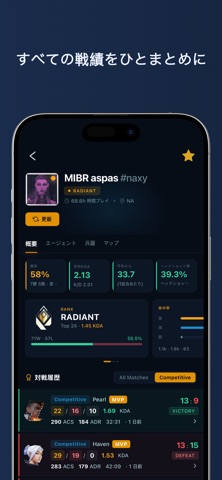


iPad screenshots


Icon palette
About this app
Valking.ggは、ヴァロラント(VALORANT)の戦績・ランク・マッチ履歴を世界中どこからでも簡単にチェックできる戦績トラッカーアプリです。すべてのデータは公式Valorant APIから取得しています。 プレイヤー検索: プロフィールを公開しているすべてのヴァロラントプレイヤーの戦績を検索できます。フレンドやライバルをお気に入りに登録して、過去のマッチの詳細統計をチェックしましょう。 マッチ統計: スコアボード、ヘッドショット率などの武器統計、KDAなど、試合ごとの詳細データを確認し、フレンドや対戦相手と比較できます。 戦績サマリー: 直近のマッチをひと目で把握できます。マップ別の統計、エージェント別のランク情報、KDA・勝率・平均ヒット数などの武器データを素早くチェックしましょう。 グローバルエージェント統計: 全エージェントの世界全体の勝率やピック率をマップ/ランク帯別にチェック。パッチごとの推移も詳しく見られます。 スキン・バンドル図鑑: ヴァロラントの全武器スキンとバンドルを一覧で見られます。各コスメティックの詳細情…
App details
What you can learn from ヴァロラント Tracker - Valking.gg
Every shipping app on the App Store has gone through the same decisions you're working through right now: which screenshot goes first, what caption sits over it, which device frame to show, what color the background should be. The 10 screenshots above are ヴァロラント Tracker - Valking.gg's answers to those questions — they're public, they're real, and they made it through Apple's review.
What the numbers say: ヴァロラント Tracker - Valking.gg runs a dark set where the background shifts from screenshot to screenshot (first shot #1C2C4C) — each image has to stand on its own, so the captions carry more of the story. The accent colour we picked up, #5CCCAC, is the one to reuse for badges, arrows and highlighted words if you borrow this look. Hit Use this style to open the editor with these exact colours and drop your own screenshot in.
Notice the first screenshot in particular. It's the one users see in search results and on the product page, and it's where most apps spend their best caption and tightest design. Look at the proportion of background to phone, where the text sits, what one thing the image is trying to communicate.
Want to see how other Reference apps approach the same problem? Browse more Reference apps in the showcase.
Take what works into your own screenshots
Open LaunchShots and design your App Store & Google Play screenshots — pick a device frame, drop captions, ship in minutes. Free, in your browser.
Open the screenshot editor →Apps with a similar look
Closest background + accent colours among the listings we've analysed — useful when you want to see the same palette handled by a different team.