Chart position — tracked daily by LaunchShots
Screenshot changes — detected by LaunchShots
Screenshot style breakdown
Sampled from 4 of 讯飞输入法-斗图表情包字体美化键盘's App Store screenshots — background, accent and theme, measured by LaunchShots (not something Apple publishes).
#CCECFC bg
#B3CFDD
#7CBCFC accent
#111111 text
Reading the caption text from the screenshots in your browser…
Screenshots


iPad screenshots


Icon palette
About this app
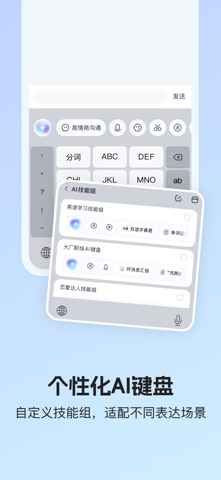
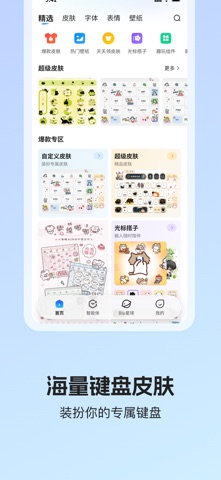
1、应用描述: 讯飞输入法,全新个性化AI 键盘实现语音输入“意图成稿”,只需说出表达需求,即可理解意图、组织信息并生成润色成可用文稿,把复杂表达变成一句话的事。 2、特色功能 【语音输入】复杂场景也能1 分钟 400 字忠实记录,支持表达润色、风格化改写,支持语音输入过程中改口澄清,行业首发“意图成稿”; 【个性化 AI 键盘】行业首创“AI 键”、“交给 AI”,技能坞支持自由定义、根据表达场景配置自己的专属技能组,懂你所想帮你表达; 【键盘装扮】海量键盘皮肤、光标搭子、字体随心选,装扮你的专属键盘,输入有趣更有颜。 3、亮点功能 【AI助手】高情商沟通、恋爱军师、百变人设、写作达人等多种助手能力,支持聊天润色、智能回复、文案创作、问答搜索等功能。 【拼音输入】丰富词库,智能纠错,丝滑联想,AI预测输入覆盖多种表达场景。 【手写输入】拼音键盘直接手写,支持叠写连写,手写出拼音,无惧生僻字。 【AI翻译】语音文字实时翻译,轻松打破语言壁垒。 【AI剪贴板】手边“智能小助理”,支持智能回复、仿写、拆词、翻译、搜索等快捷操作。 【键盘装扮…
App details
What you can learn from 讯飞输入法-斗图表情包字体美化键盘
Every shipping app on the App Store has gone through the same decisions you're working through right now: which screenshot goes first, what caption sits over it, which device frame to show, what color the background should be. The 8 screenshots above are 讯飞输入法-斗图表情包字体美化键盘's answers to those questions — they're public, they're real, and they made it through Apple's review.
What the numbers say: 讯飞输入法-斗图表情包字体美化键盘 runs a light set with one background colour (#CCECFC) carried across every screenshot — the listing reads as a single poster when the shots sit side by side in search results. The accent colour we picked up, #7CBCFC, is the one to reuse for badges, arrows and highlighted words if you borrow this look. Hit Use this style to open the editor with these exact colours and drop your own screenshot in.
Notice the first screenshot in particular. It's the one users see in search results and on the product page, and it's where most apps spend their best caption and tightest design. Look at the proportion of background to phone, where the text sits, what one thing the image is trying to communicate.
Want to see how other Utilities apps approach the same problem? Browse more Utilities apps in the showcase.
Take what works into your own screenshots
Open LaunchShots and design your App Store & Google Play screenshots — pick a device frame, drop captions, ship in minutes. Free, in your browser.
Open the screenshot editor →Apps with a similar look
Closest background + accent colours among the listings we've analysed — useful when you want to see the same palette handled by a different team.