Chart position — tracked daily by LaunchShots
Screenshot style breakdown
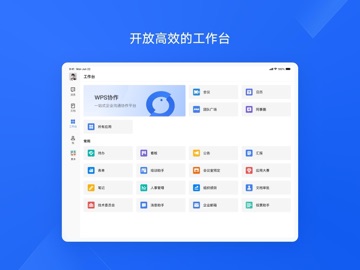
Sampled from 5 of WPS协作's App Store screenshots — background, accent and theme, measured by LaunchShots (not something Apple publishes).
#1C64F4 bg
#3B79F5
#7CA4F4 accent
#FFFFFF text
Reading the caption text from the screenshots in your browser…
Screenshots


iPad screenshots


Icon palette
About this app
一站式沟通协作平台 【高效沟通】支持多种消息强提醒能力,如:群公告、消息加急。 【多端同步】聊天记录云端存储,电脑、手机、平板多设备同步。 【全局搜索】支持搜索联系人、群聊、聊天记录,快速找回有效信息。 【企业通讯录】企业组织架构快速导入至通讯录,企业成员可随时查看。 在线文档协作更高效 【个人笔记】个人心得、工作事项随手记录个人笔记,聊天记录也支持保存到笔记。 【新建文档】支持创建文字、表格、表单、演示等多种云文档,文档内容随写随存。 【文档协作】文档一键分享至聊天中,支持与团队成员协作编辑。 【文档管理】个人、企业文档独立存储路径,提供最近历史、共享列表和星标文档。 文档与聊天深度结合 【文档提醒】文档中支持使用@提醒协作者,协作者收到通知可定位至原文提醒位置。 【文档会话】文档中支持打开聊天面板、发起讨论,讨论内容有迹可循。 【文档评论】文档节选正文内容新增评论后,支持通知协作者在会话列表直接查看。 开放高效的开放平台 【WPS会议】聊天中一键入会,会议中文档共享、同步协作,高清视频通话、安全稳…
App details
What you can learn from WPS协作
Every shipping app on the App Store has gone through the same decisions you're working through right now: which screenshot goes first, what caption sits over it, which device frame to show, what color the background should be. The 10 screenshots above are WPS协作's answers to those questions — they're public, they're real, and they made it through Apple's review.
What the numbers say: WPS协作 runs a dark set with one background colour (#1C64F4) carried across every screenshot — the listing reads as a single poster when the shots sit side by side in search results. The accent colour we picked up, #7CA4F4, is the one to reuse for badges, arrows and highlighted words if you borrow this look. Hit Use this style to open the editor with these exact colours and drop your own screenshot in.
Notice the first screenshot in particular. It's the one users see in search results and on the product page, and it's where most apps spend their best caption and tightest design. Look at the proportion of background to phone, where the text sits, what one thing the image is trying to communicate.
Want to see how other Business apps approach the same problem? Browse more Business apps in the showcase.
Take what works into your own screenshots
Open LaunchShots and design your App Store & Google Play screenshots — pick a device frame, drop captions, ship in minutes. Free, in your browser.
Open the screenshot editor →Apps with a similar look
Closest background + accent colours among the listings we've analysed — useful when you want to see the same palette handled by a different team.