Chart position — tracked daily by LaunchShots
Screenshot style breakdown
Sampled from 6 of One Player:本地音乐&手表音乐播放器&桌面歌词's App Store screenshots — background, accent and theme, measured by LaunchShots (not something Apple publishes).
#FCFCFC bg
#DDDDDD
#E46414 accent
#111111 text
Reading the caption text from the screenshots in your browser…
Screenshots


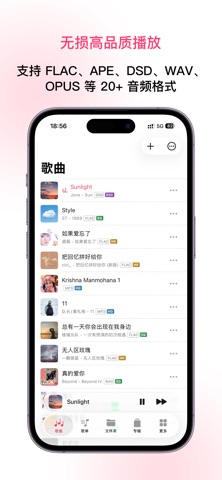


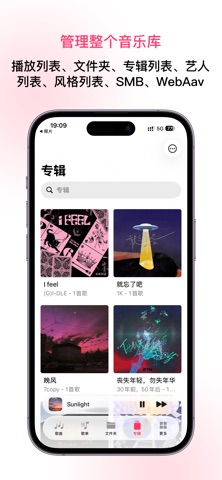


iPad screenshots


Icon palette
About this app
OnePlayer 是一款为本地音乐、无损音频和 NAS 曲库打造的专业离线音乐播放器,让你真正拥有自己的音乐。 · 已适配 iOS 26、watchOS 26 与 CarPlay 26 · 2500+ 全球五星评价 · 数十万用户,遍布全球 170+ 个国家和地区 如果你收藏了很多 FLAC、APE、DSD 或老 MP3 文件,不想让流媒体曲库决定自己能听什么;如果你有一台 NAS,希望在 iPhone、iPad、Apple Watch 和 CarPlay 上随时播放自己的音乐;如果你习惯整理专辑、封面、歌词和播放列表,OnePlayer 可以成为你的私人音乐库。 在家连接电脑或 NAS,通勤时用 Apple Watch 独立播放,开车时通过 CarPlay 浏览曲库,学习和睡前则可以配合倍速播放、跳过片头片尾与睡眠定时器使用。 OnePlayer 不是流媒体 App。你的音乐文件、播放列表、专辑封面和歌词,都由你自己掌控。 【OnePlayer 5.0|全新播放体验】 OnePlayer 5.0 从播放引擎、声音调节到网络音乐进行了全面升级。 全新播放引擎 · 全新播放引擎,性能更强,支持更多格式、更多音效, · 支持关闭、自动、96 kHz 和 192 kHz 升频播放模式 · 显示音源、请求…
App details
What you can learn from One Player:本地音乐&手表音乐播放器&桌面歌词
Every shipping app on the App Store has gone through the same decisions you're working through right now: which screenshot goes first, what caption sits over it, which device frame to show, what color the background should be. The 17 screenshots above are One Player:本地音乐&手表音乐播放器&桌面歌词's answers to those questions — they're public, they're real, and they made it through Apple's review.
What the numbers say: One Player:本地音乐&手表音乐播放器&桌面歌词 runs a light set with one background colour (#FCFCFC) carried across every screenshot — the listing reads as a single poster when the shots sit side by side in search results. The accent colour we picked up, #E46414, is the one to reuse for badges, arrows and highlighted words if you borrow this look. Hit Use this style to open the editor with these exact colours and drop your own screenshot in.
Notice the first screenshot in particular. It's the one users see in search results and on the product page, and it's where most apps spend their best caption and tightest design. Look at the proportion of background to phone, where the text sits, what one thing the image is trying to communicate.
Want to see how other Music apps approach the same problem? Browse more Music apps in the showcase.
Take what works into your own screenshots
Open LaunchShots and design your App Store & Google Play screenshots — pick a device frame, drop captions, ship in minutes. Free, in your browser.
Open the screenshot editor →Apps with a similar look
Closest background + accent colours among the listings we've analysed — useful when you want to see the same palette handled by a different team.