Chart position — tracked daily by LaunchShots
Screenshot style breakdown
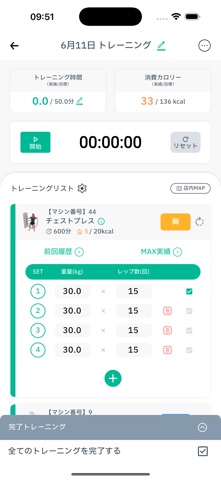
Sampled from 5 of TRESUL - トレスル's App Store screenshots — background, accent and theme, measured by LaunchShots (not something Apple publishes).
#747474 bg
#878787
#049474 accent
#FFFFFF text
- #3Q sit ©5008 © 33/136 keal
Captions read from the screenshots (OCR, may contain small errors): 1 headline, 6 words on average (longest 6).
Screenshots



iPad screenshots


Icon palette
About this app
本アプリは、TRESUL契約店舗の会員様限定アプリとなります。 ※契約店舗によってご利用できない機能もあります。 TRESULの4つの特徴 ▼トレーニング管理 日々のトレーニングの記録はもちろん、 トレーナーに変わって、TRESULがユーザーの目標に合わせた おすすめトレーニングメニューの提案! ▼食事管理 食事データを記録すれば自動でカロリー計算 目標に合わせた日々の摂取カロリーも自動で計算! トレーナーとのデータ共有&コメント機能もあります ▼予約システム 契約店舗のスタジオレッスン(プログラム)をTRESUL上で簡単に予約! ▼入退室の施錠 無人店舗への入退室もTRESULがあれば携帯電話1つで鍵の代わりに! Appleヘルスケアから歩数を取得し、他のトレーニングを含めた消費カロリーを計算します。
App details
What you can learn from TRESUL - トレスル
Every shipping app on the App Store has gone through the same decisions you're working through right now: which screenshot goes first, what caption sits over it, which device frame to show, what color the background should be. The 11 screenshots above are TRESUL - トレスル's answers to those questions — they're public, they're real, and they made it through Apple's review.
What the numbers say: TRESUL - トレスル runs a mixed light-and-dark set where the background shifts from screenshot to screenshot (first shot #747474) — each image has to stand on its own, so the captions carry more of the story. The accent colour we picked up, #049474, is the one to reuse for badges, arrows and highlighted words if you borrow this look. Hit Use this style to open the editor with these exact colours and drop your own screenshot in.
Notice the first screenshot in particular. It's the one users see in search results and on the product page, and it's where most apps spend their best caption and tightest design. Look at the proportion of background to phone, where the text sits, what one thing the image is trying to communicate.
Want to see how other Health & Fitness apps approach the same problem? Browse more Health & Fitness apps in the showcase.
Take what works into your own screenshots
Open LaunchShots and design your App Store & Google Play screenshots — pick a device frame, drop captions, ship in minutes. Free, in your browser.
Open the screenshot editor →Apps with a similar look
Closest background + accent colours among the listings we've analysed — useful when you want to see the same palette handled by a different team.