Chart position — tracked daily by LaunchShots
Screenshot changes — detected by LaunchShots
Screenshot style breakdown
Sampled from 6 of CATCHTABLE:人気レストランの順番待ち・予約's App Store screenshots — background, accent and theme, measured by LaunchShots (not something Apple publishes).
#ECECEC bg
#CFCFCF
#DC6C04 accent
#111111 text
Screenshots




Icon palette
About this app
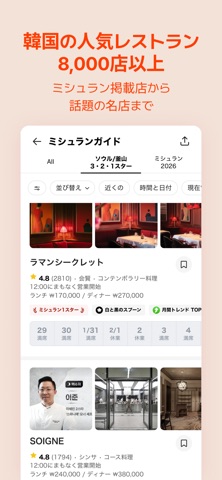
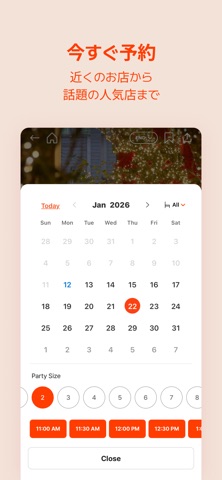
ミシュラン掲載店からローカルの名店まで CATCHTABLEで、探す・予約する・楽しむをすべて一つに 韓国で350万人、世界で100万人が利用する CATCHTABLEは、韓国No.1のレストラン検索・予約アプリです。 ■ 8,000店以上のレストランを簡単に探せます ・20言語対応でスムーズに検索 ・韓国の人気レストランを一括でチェック ・テーマ別キュレーションで理想のお店を発見 ・日時、人数、エリア、料理ジャンルで細かく絞り込み ・価格や駐車場などの情報をひと目で確認 ・実際の来店者による5万件以上の信頼できるレビュー ■ 安心して予約・ウェイティング ・韓国の電話番号不要 ・既存のメールアドレスとクレジットカードで簡単決済 ・電話不要、24時間リアルタイム予約 ・リモートウェイティングで現地待ち時間なし ■ 予約管理もスムーズに ・メールやアプリ通知で予約内容をすぐに確認 ・My Diningで予約・ウェイティング履歴を一括管理 【任意のアクセス権について】 位置情報:近くのレストラン検索のため現在地を取得 写真/カメラ:レビュー写真のアップロードお…
App details
What you can learn from CATCHTABLE:人気レストランの順番待ち・予約
Every shipping app on the App Store has gone through the same decisions you're working through right now: which screenshot goes first, what caption sits over it, which device frame to show, what color the background should be. The 10 screenshots above are CATCHTABLE:人気レストランの順番待ち・予約's answers to those questions — they're public, they're real, and they made it through Apple's review.
What the numbers say: CATCHTABLE:人気レストランの順番待ち・予約 runs a light set with one background colour (#ECECEC) carried across every screenshot — the listing reads as a single poster when the shots sit side by side in search results. The accent colour we picked up, #DC6C04, is the one to reuse for badges, arrows and highlighted words if you borrow this look. Hit Use this style to open the editor with these exact colours and drop your own screenshot in.
Notice the first screenshot in particular. It's the one users see in search results and on the product page, and it's where most apps spend their best caption and tightest design. Look at the proportion of background to phone, where the text sits, what one thing the image is trying to communicate.
Want to see how other Food & Drink apps approach the same problem? Browse more Food & Drink apps in the showcase.
Take what works into your own screenshots
Open LaunchShots and design your App Store & Google Play screenshots — pick a device frame, drop captions, ship in minutes. Free, in your browser.
Open the screenshot editor →Apps with a similar look
Closest background + accent colours among the listings we've analysed — useful when you want to see the same palette handled by a different team.