Chart position — tracked daily by LaunchShots
Screenshot changes — detected by LaunchShots
Screenshot style breakdown
Sampled from 6 of LiberLive's App Store screenshots — background, accent and theme, measured by LaunchShots (not something Apple publishes).
#344CFC bg
#5065FC
#04244C accent
#FFFFFF text
Screenshots


iPad screenshots




Icon palette
About this app
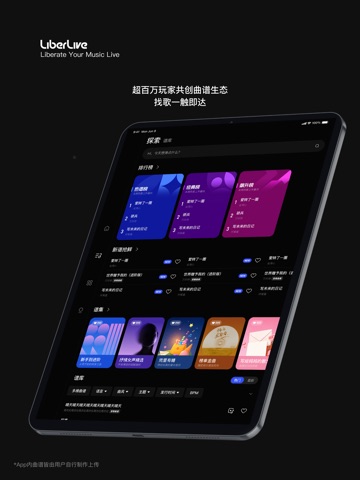
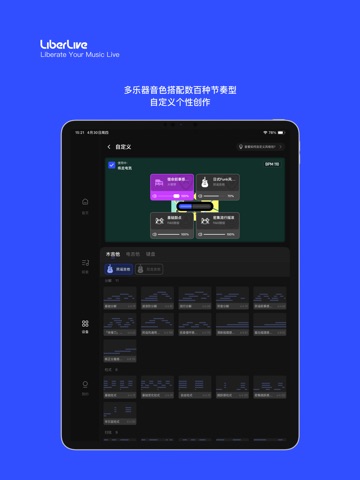
LiberLive App是LiberLive全系列智能硬件产品的专属配套应用,也是集音乐内容、创作工具和玩家社区为一体的生态体验平台。只需一键连接蓝牙,即可解锁有关弹唱的丰富玩法。更有缤纷风格包全新上线,让你用简单的方式也能玩出高上限的音乐。 【交互式曲谱】 曲谱提示与硬件灯光联动,和弦色块实时推进提示 不同模式对应不同曲谱视图,玩法随心切换 【风格配置】 一键应用预设风格包,提升弹唱表现力 和弦样式、鼓机样式随心搭,演绎音乐个性 【海量谱库】 超百万玩家共创曲谱生态,每日更新不断 搜索/分类/谱集,哪里都能找到你喜欢的曲谱 更有自制曲谱,复刻与原创,由你来决定 【引导与教程】 跟随互动式新手引导,三分钟即可上手弹唱 视频教程专区,覆盖全功能玩法 轻松从入门到进阶,新手到高手 【一站式创作】 支持弹-唱-录-发,生成作品一气呵成 一键发布,随时与世界分享你的音乐 【全玩家社区】 玩家配置共享,一键复制使用 与兴趣同好社交互动,分享趣味与快乐 LiberLive生态硬件产品一起玩,激发更多创作可能 【更多设置】 自定义调号、速度,适合自…
App details
What you can learn from LiberLive
Every shipping app on the App Store has gone through the same decisions you're working through right now: which screenshot goes first, what caption sits over it, which device frame to show, what color the background should be. The 15 screenshots above are LiberLive's answers to those questions — they're public, they're real, and they made it through Apple's review.
What the numbers say: LiberLive runs a dark set where the background shifts from screenshot to screenshot (first shot #344CFC) — each image has to stand on its own, so the captions carry more of the story. The accent colour we picked up, #04244C, is the one to reuse for badges, arrows and highlighted words if you borrow this look. Hit Use this style to open the editor with these exact colours and drop your own screenshot in.
Notice the first screenshot in particular. It's the one users see in search results and on the product page, and it's where most apps spend their best caption and tightest design. Look at the proportion of background to phone, where the text sits, what one thing the image is trying to communicate.
Want to see how other Music apps approach the same problem? Browse more Music apps in the showcase.
Take what works into your own screenshots
Open LaunchShots and design your App Store & Google Play screenshots — pick a device frame, drop captions, ship in minutes. Free, in your browser.
Open the screenshot editor →Apps with a similar look
Closest background + accent colours among the listings we've analysed — useful when you want to see the same palette handled by a different team.