Chart position — tracked daily by LaunchShots
Screenshot style breakdown
Sampled from 6 of strefajob.pl's App Store screenshots — background, accent and theme, measured by LaunchShots (not something Apple publishes).
#C42C24 bg
#CC4942
#643C34 accent
#FFFFFF text
Screenshots




Icon palette
About this app
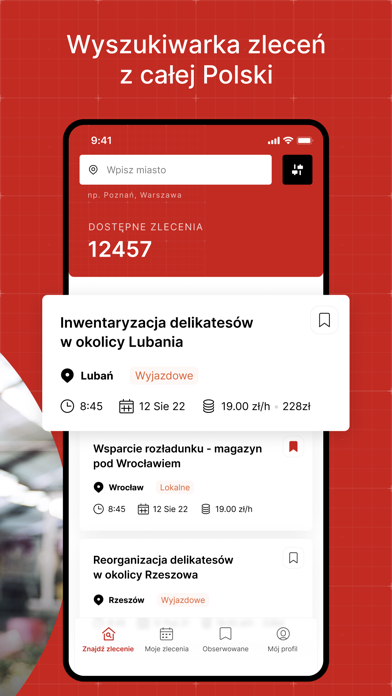
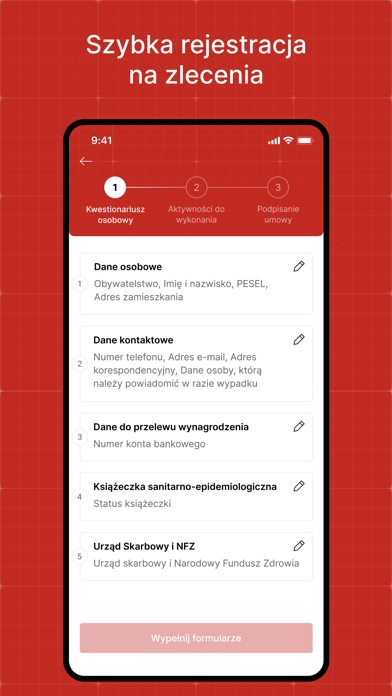
Znajdź pracę dorywczą dla siebie spośród zleceń w całej Polsce! Jak to działa? 1. Zainstaluj naszą aplikację i jeszcze szybciej podejmuj zlecenia gdzie i kiedy chcesz! 2. Wybierz zlecenie - w wyszukiwarce wpisz miasto lub skorzystaj z dodatkowych filtrów. 3. Przejdź wdrożenie online - poznaj warunki pracy i płacy, obowiązki na wybranym zleceniu i osoby do kontaktu, które odpowiedzą na Twoje ewentualne pytania. Poznasz również podstawowe zasady BHP. 4. Podpisz umowę online i idź na zlecenie - wystarczy, że raz uzupełnisz kwestionariusz osobowy, a kolejne umowy zlecenia będziesz podpisywać jednym kliknięciem. 5. Zgarniaj premie i benefity - podejmując z nami zlecenia, możesz zyskać coś więcej niż tylko wynagrodzenie. Pracuj z nami, zarabiaj i otrzymuj dodatkowe profity np. premie za kumpla, frekwencję czy kartę Multisport.
App details
What you can learn from strefajob.pl
Every shipping app on the App Store has gone through the same decisions you're working through right now: which screenshot goes first, what caption sits over it, which device frame to show, what color the background should be. The 6 screenshots above are strefajob.pl's answers to those questions — they're public, they're real, and they made it through Apple's review.
What the numbers say: strefajob.pl runs a dark set with one background colour (#C42C24) carried across every screenshot — the listing reads as a single poster when the shots sit side by side in search results. The accent colour we picked up, #643C34, is the one to reuse for badges, arrows and highlighted words if you borrow this look. Hit Use this style to open the editor with these exact colours and drop your own screenshot in.
Notice the first screenshot in particular. It's the one users see in search results and on the product page, and it's where most apps spend their best caption and tightest design. Look at the proportion of background to phone, where the text sits, what one thing the image is trying to communicate.
Want to see how other Business apps approach the same problem? Browse more Business apps in the showcase.
Take what works into your own screenshots
Open LaunchShots and design your App Store & Google Play screenshots — pick a device frame, drop captions, ship in minutes. Free, in your browser.
Open the screenshot editor →Apps with a similar look
Closest background + accent colours among the listings we've analysed — useful when you want to see the same palette handled by a different team.