Chart position — tracked daily by LaunchShots
Screenshot style breakdown
Sampled from 6 of Remo复古相机-CCD数码胶片滤镜特效's App Store screenshots — background, accent and theme, measured by LaunchShots (not something Apple publishes).
#2C2C2C bg
#494949
#B49464 accent
#FFFFFF text
Reading the caption text from the screenshots in your browser…
Screenshots




Icon palette
About this app
【应用描述】: 是否厌倦了每天修图发朋友圈,是否发现后期P图好难? Remo复古相机-模拟多款经典相机出片特点,轻松拍出拥有浓郁复古色彩的颗粒感照片,拿捏氛围感,一秒变高级,让你的表达更加独特个性。其中的实况拍照,可以解决一个动作反复拍无法拍出满意照片的难题,助你选出最美一帧。 用Remo,只需按下快门,不用在意自己的黑眼圈,不需PS,在镜头里或开心大笑,或发呆放空,每个人都是生动的个体,张张都是有情绪的照片。 【出色功能】: -一键出片:只需按下快门,即可拥有真实的胶片质感,一秒变高级 -自动拼图:拍照前选好喜欢的拼图模式,拍完即得拼好的照片 -实况拍照:解决一个动作反复拍无法拍出满意照片的难题,轻松选出精美一帧 -小框取景:帮助构图,更加突出照片的主体和层次感 -补光灯:各种颜色的补光灯打造氛围感,且可边补光边自拍 -多种特效:有漏光、划痕、鱼眼等基础特效,还有彩带、星光、飘雪等动态特效,照片刷爆朋友圈 -收藏夹:收藏6款常用相机,方便快速开启拍摄 -实时预览:取景框实时预览效果,所见即所得 -导入图片:支持照片导入…
App details
What you can learn from Remo复古相机-CCD数码胶片滤镜特效
Every shipping app on the App Store has gone through the same decisions you're working through right now: which screenshot goes first, what caption sits over it, which device frame to show, what color the background should be. The 10 screenshots above are Remo复古相机-CCD数码胶片滤镜特效's answers to those questions — they're public, they're real, and they made it through Apple's review.
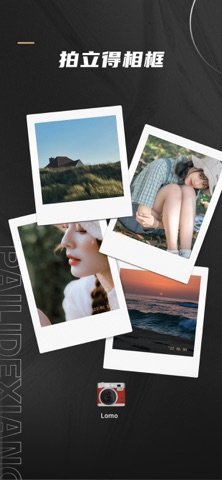
What the numbers say: Remo复古相机-CCD数码胶片滤镜特效 runs a dark set with one background colour (#2C2C2C) carried across every screenshot — the listing reads as a single poster when the shots sit side by side in search results. The accent colour we picked up, #B49464, is the one to reuse for badges, arrows and highlighted words if you borrow this look. Hit Use this style to open the editor with these exact colours and drop your own screenshot in.
Notice the first screenshot in particular. It's the one users see in search results and on the product page, and it's where most apps spend their best caption and tightest design. Look at the proportion of background to phone, where the text sits, what one thing the image is trying to communicate.
Want to see how other Photo & Video apps approach the same problem? Browse more Photo & Video apps in the showcase.
Take what works into your own screenshots
Open LaunchShots and design your App Store & Google Play screenshots — pick a device frame, drop captions, ship in minutes. Free, in your browser.
Open the screenshot editor →Apps with a similar look
Closest background + accent colours among the listings we've analysed — useful when you want to see the same palette handled by a different team.