Chart position — tracked daily by LaunchShots
Screenshot style breakdown
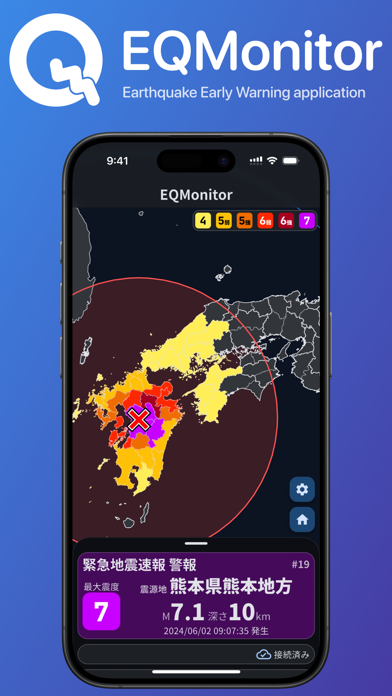
Sampled from 4 of EQMonitor 地震速報's App Store screenshots — background, accent and theme, measured by LaunchShots (not something Apple publishes).
#3C74D4 bg
#5787DA
#440C5C accent
#FFFFFF text
- #1EQMonitor Q Earthquake Early Warning application EQMonitor
Captions read from the screenshots (OCR, may contain small errors): 1 headline, 7 words on average (longest 7).
Screenshots


iPad screenshots


Icon palette
About this app
EQMonitorは、日本全国の地震情報をいち早く受信できるアプリケーションです。 【機能】 ・地震情報・緊急地震速報の通知 ・地域ごとに通知する条件を指定できます ・気象庁により発表された地震情報や、緊急地震速報を受信し、通知します。 ・過去の地震履歴の閲覧 ・過去に発表された地震情報を遡って確認できます。 ・震度データベースにより、1919年以降の地震履歴を確認できます。 ・緊急地震速報のリアルタイム表示 ・緊急地震速報が発表された際に、P波・S波の予想到達範囲、予想最大震度、震央地を表示します。 ・緊急地震速報は、リアルタイムに更新され、インターネットに接続されていれば、どこからでも確認できます。 ・強震モニタの表示 ・防災科学技術研究所の提供するWebサービス 強震モニタ を表示します。 (※ 強震モニタは、揺れの様子を直感的に捉えることを目的としています。また、リアルタイムで観測値を処理しているため、ノイズ等により観測値が変動します。 そのため、本アプリケーションで表示される…
App details
What you can learn from EQMonitor 地震速報
Every shipping app on the App Store has gone through the same decisions you're working through right now: which screenshot goes first, what caption sits over it, which device frame to show, what color the background should be. The 7 screenshots above are EQMonitor 地震速報's answers to those questions — they're public, they're real, and they made it through Apple's review.
What the numbers say: EQMonitor 地震速報 runs a dark set where the background shifts from screenshot to screenshot (first shot #3C74D4) — each image has to stand on its own, so the captions carry more of the story. The accent colour we picked up, #440C5C, is the one to reuse for badges, arrows and highlighted words if you borrow this look. Hit Use this style to open the editor with these exact colours and drop your own screenshot in.
Notice the first screenshot in particular. It's the one users see in search results and on the product page, and it's where most apps spend their best caption and tightest design. Look at the proportion of background to phone, where the text sits, what one thing the image is trying to communicate.
Want to see how other Weather apps approach the same problem? Browse more Weather apps in the showcase.
Take what works into your own screenshots
Open LaunchShots and design your App Store & Google Play screenshots — pick a device frame, drop captions, ship in minutes. Free, in your browser.
Open the screenshot editor →Apps with a similar look
Closest background + accent colours among the listings we've analysed — useful when you want to see the same palette handled by a different team.