Chart position — tracked daily by LaunchShots
Screenshot style breakdown
Sampled from 5 of 一键清理-图片清晰度增强、图片压缩's App Store screenshots — background, accent and theme, measured by LaunchShots (not something Apple publishes).
#14B47C bg
#119E6D
#D4FC84 accent
#111111 text
Screenshots


Icon palette
About this app
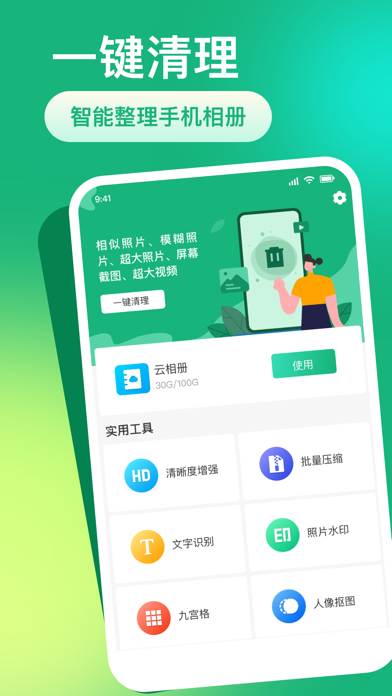
一键清理可以帮助您快速整理手机相册。 应用包含如下功能: 相册整理:智能识别相似、模糊、超大图片视频 云相册:上传本地图片至云端,以节省手机空间 清晰度增强:提高图片的清晰度 批量压缩:批量压缩图片,降低空间占用 文字识别:智能提取图片中的文字 照片水印:为图片添加水印信息 九宫格:将图片均分为9个 人像抠图:一键扣除人物背景 用户协议:https://docs.qq.com/doc/p/71dd1d1a6abc3152ddb764664a505c4619ebc570 隐私协议:https://docs.qq.com/doc/p/853c64014923484255baae2478706ae6d203eac8
App details
What you can learn from 一键清理-图片清晰度增强、图片压缩
Every shipping app on the App Store has gone through the same decisions you're working through right now: which screenshot goes first, what caption sits over it, which device frame to show, what color the background should be. The 5 screenshots above are 一键清理-图片清晰度增强、图片压缩's answers to those questions — they're public, they're real, and they made it through Apple's review.
What the numbers say: 一键清理-图片清晰度增强、图片压缩 runs a light set with one background colour (#14B47C) carried across every screenshot — the listing reads as a single poster when the shots sit side by side in search results. The accent colour we picked up, #D4FC84, is the one to reuse for badges, arrows and highlighted words if you borrow this look. Hit Use this style to open the editor with these exact colours and drop your own screenshot in.
Notice the first screenshot in particular. It's the one users see in search results and on the product page, and it's where most apps spend their best caption and tightest design. Look at the proportion of background to phone, where the text sits, what one thing the image is trying to communicate.
Want to see how other Reference apps approach the same problem? Browse more Reference apps in the showcase.
Take what works into your own screenshots
Open LaunchShots and design your App Store & Google Play screenshots — pick a device frame, drop captions, ship in minutes. Free, in your browser.
Open the screenshot editor →Apps with a similar look
Closest background + accent colours among the listings we've analysed — useful when you want to see the same palette handled by a different team.