Chart position — tracked daily by LaunchShots
Screenshot style breakdown
Sampled from 6 of マツキヨココカラ公式アプリ's App Store screenshots — background, accent and theme, measured by LaunchShots (not something Apple publishes).
#FCFCFC bg
#DDDDDD
#F4EC4C accent
#111111 text
Screenshots




Icon palette
About this app
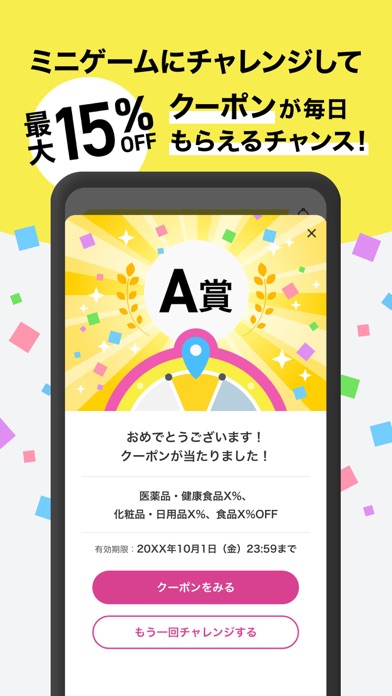
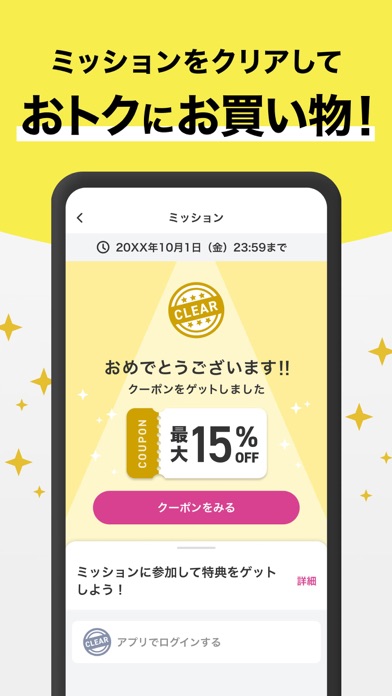
【新しくなった、マツキヨココカラ公式アプリの特徴】 ・ダウンロードするだけですぐに店内商品10%オフクーポンがもらえる ・ミッションでも、ログインするだけで店内商品10%オフクーポンがもらえる ・おトクな情報をプッシュ通知で直接受け取れる ・現在地から近隣の店舗を探し、チラシ情報を手軽に確認可能 【主な機能の紹介】 ■会員証 カードを持ち歩かなくても、アプリのバーコードを見せるだけでポイントがたまります。 ■ミニゲーム 毎日最大2回、ルーレットに挑戦して、おトクなクーポンを獲得できます。 ■クーポン あなたのニーズに合わせた、特別なクーポンをお届けします。 ■ミッション 「ミッション」は、ゲーム感覚で、チャレンジできる機能です。 クリアするとポイントやクーポンを獲得できます。 ■チラシ 位置情報を許可すると、近くの店舗のチラシ情報を取得できます。店舗検索で気になる店舗のチラシ情報も取得できます。 ※画像の報酬や内容は一例です。タイミングによって報酬の内容は変動します ※動作保証環境 iOS16.4以上 ※iPad では動作…
App details
What you can learn from マツキヨココカラ公式アプリ
Every shipping app on the App Store has gone through the same decisions you're working through right now: which screenshot goes first, what caption sits over it, which device frame to show, what color the background should be. The 7 screenshots above are マツキヨココカラ公式アプリ's answers to those questions — they're public, they're real, and they made it through Apple's review.
What the numbers say: マツキヨココカラ公式アプリ runs a light set where the background shifts from screenshot to screenshot (first shot #FCFCFC) — each image has to stand on its own, so the captions carry more of the story. The accent colour we picked up, #F4EC4C, is the one to reuse for badges, arrows and highlighted words if you borrow this look. Hit Use this style to open the editor with these exact colours and drop your own screenshot in.
Notice the first screenshot in particular. It's the one users see in search results and on the product page, and it's where most apps spend their best caption and tightest design. Look at the proportion of background to phone, where the text sits, what one thing the image is trying to communicate.
Want to see how other Shopping apps approach the same problem? Browse more Shopping apps in the showcase.
Take what works into your own screenshots
Open LaunchShots and design your App Store & Google Play screenshots — pick a device frame, drop captions, ship in minutes. Free, in your browser.
Open the screenshot editor →Apps with a similar look
Closest background + accent colours among the listings we've analysed — useful when you want to see the same palette handled by a different team.