Chart position — tracked daily by LaunchShots
Screenshot style breakdown
Sampled from 5 of Elavatine: 专业健身营养管理's App Store screenshots — background, accent and theme, measured by LaunchShots (not something Apple publishes).
#0454FC bg
#276BFC
#9CBCFC accent
#FFFFFF text
Screenshots


iPad screenshots




Icon palette
About this app
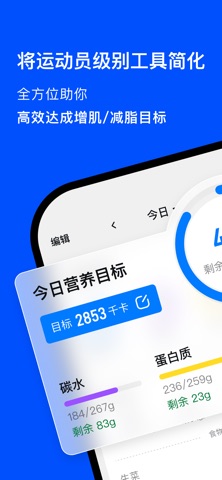
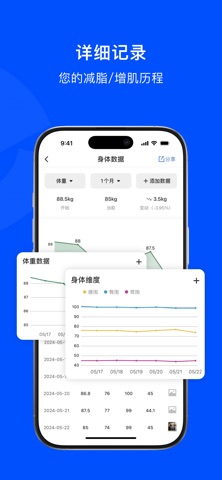
为健身爱好者、教练以及对增肌减脂结果有高要求的人群设计。集专业饮食记录与 AI 营养教练于一体,全方位助你达成目标。 权威营养数据库 内置海量食物数据,源自美国农业部 (USDA)、香港卫生署等权威机构,提供严谨、全面的营养信息支持。 科学记录饮食 极速录入每日饮食,营养目标一目了然。用可视化的数据报表,将复杂的饮食计划化繁为简。 专属 AI 教练 多维追踪饮食、训练与形体数据,建立动态代谢模型,为你精准校准下一阶段的营养素目标。 运动员级饮食方案 由专业运动员与营养师共同打造的核心算法,结合你的健身目标、水平和生活习惯,量身定制高阶饮食计划。 告别刻板,高弹性执行 执行计划时,允许根据当日实际状态灵活替换、增减食物。告别机械式的生搬硬套,将掌控权交还给你,从根源消除饮食焦虑。 更多专业模块: 身体数据 全面追踪各项围度与体态变化 运动消耗 智能评估并记录你的运动与日常消耗 力量训练 记录训练与休息日,轻松复盘进度 碳水循环策略 提供专业预设模板,支持自由定制 饮水追踪 追踪每日饮水,维持良好代谢 ELA PRO 会…
App details
What you can learn from Elavatine: 专业健身营养管理
Every shipping app on the App Store has gone through the same decisions you're working through right now: which screenshot goes first, what caption sits over it, which device frame to show, what color the background should be. The 10 screenshots above are Elavatine: 专业健身营养管理's answers to those questions — they're public, they're real, and they made it through Apple's review.
What the numbers say: Elavatine: 专业健身营养管理 runs a dark set with one background colour (#0454FC) carried across every screenshot — the listing reads as a single poster when the shots sit side by side in search results. The accent colour we picked up, #9CBCFC, is the one to reuse for badges, arrows and highlighted words if you borrow this look. Hit Use this style to open the editor with these exact colours and drop your own screenshot in.
Notice the first screenshot in particular. It's the one users see in search results and on the product page, and it's where most apps spend their best caption and tightest design. Look at the proportion of background to phone, where the text sits, what one thing the image is trying to communicate.
Want to see how other Health & Fitness apps approach the same problem? Browse more Health & Fitness apps in the showcase.
Take what works into your own screenshots
Open LaunchShots and design your App Store & Google Play screenshots — pick a device frame, drop captions, ship in minutes. Free, in your browser.
Open the screenshot editor →Apps with a similar look
Closest background + accent colours among the listings we've analysed — useful when you want to see the same palette handled by a different team.