Chart position — tracked daily by LaunchShots
Screenshot changes — detected by LaunchShots
Screenshot style breakdown
Sampled from 6 of Roomba Home's App Store screenshots — background, accent and theme, measured by LaunchShots (not something Apple publishes).
#ECF4EC bg
#CFD6CF
#44746C accent
#111111 text
- #511:00 AM [| @) 9:41 AM «©
Captions read from the screenshots (OCR, may contain small errors): 1 headline, 7 words on average (longest 7), mostly ALL CAPS.
Screenshots

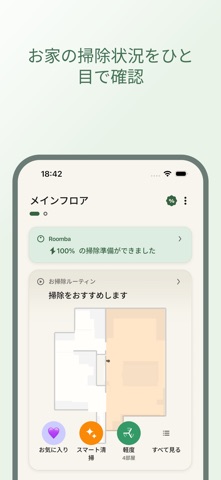
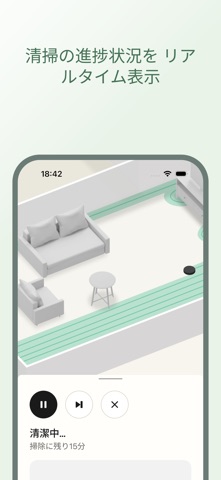

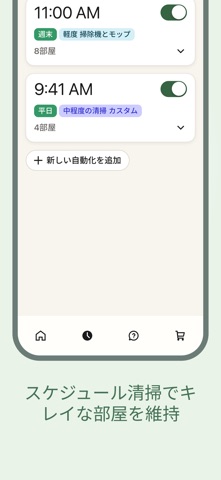

iPad screenshots


Icon palette
About this app
Roomba® Homeアプリは、2025年3月以降に販売されるRoomba® 100、200、400、500、700、およびMiniシリーズのロボットに対応しています。その他のモデルについては、iRobot Home(Classic)アプリをダウンロードしてください。 直感的に操作できるRoomba® Homeアプリで、掃除のレベルが上がります。ロボットの起動、停止、スケジュール設定、清掃設定の調整、自宅の詳細なマップのカスタマイズ、パーソナライズされた清掃ルーチンの作成を簡単に行えます。過去の清掃履歴から、清掃する部屋に適した設定が自動的に行われます。ロボットがどこをどのように清掃しているかをリアルタイムに確認し、製品のお手入れが必要な時期をお知らせしたり、シームレスなスマートホーム連携を実現します。セットアップから日常的な使用まで、Roomba® Homeアプリは最小限の労力で自宅を清潔に保てるように、使いやすく、インテリジェントな提案を提供します。 - 簡単でシームレスなセットアップ:わかりやすい初期利用ガイドが、開封から初めて清掃するまでを役に立つヒントとともに…
App details
What you can learn from Roomba Home
Every shipping app on the App Store has gone through the same decisions you're working through right now: which screenshot goes first, what caption sits over it, which device frame to show, what color the background should be. The 12 screenshots above are Roomba Home's answers to those questions — they're public, they're real, and they made it through Apple's review.
What the numbers say: Roomba Home runs a light set with one background colour (#ECF4EC) carried across every screenshot — the listing reads as a single poster when the shots sit side by side in search results. The accent colour we picked up, #44746C, is the one to reuse for badges, arrows and highlighted words if you borrow this look. Hit Use this style to open the editor with these exact colours and drop your own screenshot in.
Notice the first screenshot in particular. It's the one users see in search results and on the product page, and it's where most apps spend their best caption and tightest design. Look at the proportion of background to phone, where the text sits, what one thing the image is trying to communicate.
Want to see how other Lifestyle apps approach the same problem? Browse more Lifestyle apps in the showcase.
Take what works into your own screenshots
Open LaunchShots and design your App Store & Google Play screenshots — pick a device frame, drop captions, ship in minutes. Free, in your browser.
Open the screenshot editor →Apps with a similar look
Closest background + accent colours among the listings we've analysed — useful when you want to see the same palette handled by a different team.