launchshots / showcase / weather / drone map: fly spots & weather

Drone Map: Fly Spots & Weather

Weather ★ 4.2 (104) Free 4+ 93.8 MB

Chart position — tracked daily by LaunchShots

#33 of 100
Top Free Weather · United Kingdom
best #33 · 8 days tracked · as of Nov 22
▲ 20 / 7d
#60 of 100
Top Free Weather · Spain
best #60 · 7 days tracked · as of Nov 22
▲ 25 / 7d
#93 of 100
Top Free Weather · Italy
best #87 · 6 days tracked · as of Nov 21
▲ 1 / 7d

Screenshot changes — detected by LaunchShots

Oct 11, 2026
Drone Map: Fly Spots & Weather replaced the screenshot images (same count, theme and layout). →
Oct 3, 2026
Drone Map: Fly Spots & Weather added 1 iPhone screenshot (9 → 10). →
Sep 18, 2026
Drone Map: Fly Spots & Weather added 3 iPhone screenshots (6 → 9); switched from a light to a mixed theme; changed the background colour from #FCFCFC to #04040C; started varying the background per screenshot. →
Aug 28, 2026
Drone Map: Fly Spots & Weather added 6 iPhone screenshots (0 → 6).

Screenshot style breakdown

Sampled from 6 of Drone Map: Fly Spots & Weather's App Store screenshots — background, accent and theme, measured by LaunchShots (not something Apple publishes).

Use this style →
10 iPhone screenshots · 10 iPad Mixed light / dark Background changes per screenshot
#04040C bg #27272E #14A4B4 accent #FFFFFF text
vs. Weather apps we've analysed (2243): 34% use a light theme; 31% put the caption above the phone — Drone Map: Fly Spots & Weather uses no captions; the average set has 6 screenshots — Drone Map: Fly Spots & Weather ships 10. Full Weather benchmark →

Screenshots

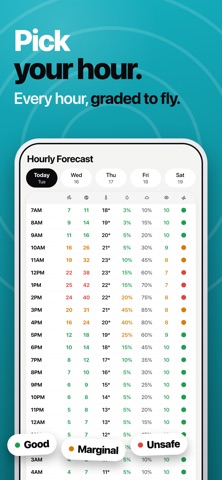
#1 Drone Map: Fly Spots & Weather iPhone screenshot 1
#2 Drone Map: Fly Spots & Weather iPhone screenshot 2
#3 Drone Map: Fly Spots & Weather iPhone screenshot 3
#4 Drone Map: Fly Spots & Weather iPhone screenshot 4
#5 Drone Map: Fly Spots & Weather iPhone screenshot 5
#6 Drone Map: Fly Spots & Weather iPhone screenshot 6
#7 Drone Map: Fly Spots & Weather iPhone screenshot 7
#8 Drone Map: Fly Spots & Weather iPhone screenshot 8
#9 Drone Map: Fly Spots & Weather iPhone screenshot 9
#10 Drone Map: Fly Spots & Weather iPhone screenshot 10

iPad screenshots

#1 Drone Map: Fly Spots & Weather iPad screenshot 1
#2 Drone Map: Fly Spots & Weather iPad screenshot 2
#3 Drone Map: Fly Spots & Weather iPad screenshot 3
#4 Drone Map: Fly Spots & Weather iPad screenshot 4
#5 Drone Map: Fly Spots & Weather iPad screenshot 5
#6 Drone Map: Fly Spots & Weather iPad screenshot 6
#7 Drone Map: Fly Spots & Weather iPad screenshot 7
#8 Drone Map: Fly Spots & Weather iPad screenshot 8
#9 Drone Map: Fly Spots & Weather iPad screenshot 9
#10 Drone Map: Fly Spots & Weather iPad screenshot 10

Icon palette

extracting…
Dominant colors sampled from the icon — click any swatch to copy the hex.

About this app

Drone Map: The Essential App for Drone Pilots Discover, plan, fly, and organise your drone adventures with Drone Map — the all-in-one app built to help drone pilots check airspace, review drone weather, log flights, find great places to fly, and connect with a community of pilots worldwide. Plan Safer Flights with Airspace Tools Check nearby airspace information, local airports, and no-fly zone data before you take off. Use dedicated flight planning tools to view restrictions for your current location or search other areas, helping you make safer, more informed flight decisions wherever you plan to fly. Check Drone Weather Forecasts Review drone weather conditions before launching, including wind, gusts, rain, visibility, humidity, cloud base, GPS signal, and more. Extended forecasts, hourly weather breakdowns, safe-to-fly insights, and detailed forecast data are available with a pur…

App details

Bundle ID
com.chrishefferman.My-Drone-Spots
Latest version
8.3.1
Released
Jul 16, 2024
Last updated
Nov 19, 2026
Languages
6 (CS, EN, FR, DE, IT…)
Genres
Weather, Utilities

What you can learn from Drone Map: Fly Spots & Weather

Every shipping app on the App Store has gone through the same decisions you're working through right now: which screenshot goes first, what caption sits over it, which device frame to show, what color the background should be. The 20 screenshots above are Drone Map: Fly Spots & Weather's answers to those questions — they're public, they're real, and they made it through Apple's review.

What the numbers say: Drone Map: Fly Spots & Weather runs a mixed light-and-dark set where the background shifts from screenshot to screenshot (first shot #04040C) — each image has to stand on its own, so the captions carry more of the story. The accent colour we picked up, #14A4B4, is the one to reuse for badges, arrows and highlighted words if you borrow this look. Hit Use this style to open the editor with these exact colours and drop your own screenshot in.

Notice the first screenshot in particular. It's the one users see in search results and on the product page, and it's where most apps spend their best caption and tightest design. Look at the proportion of background to phone, where the text sits, what one thing the image is trying to communicate.

Want to see how other Weather apps approach the same problem? Browse more Weather apps in the showcase.

Take what works into your own screenshots

Open LaunchShots and design your App Store & Google Play screenshots — pick a device frame, drop captions, ship in minutes. Free, in your browser.

Open the screenshot editor →

Apps with a similar look

Closest background + accent colours among the listings we've analysed — useful when you want to see the same palette handled by a different team.

Online Practice - NGL
#040404 #0CA4BC
Salud Informa
#040404 #1CACAC
myUnesa
#040404 #04A4BC
Moises: 뮤지션의 앱
#04040C #04ACC4
Moises:音乐人应用
#04040C #04ACC4
Connect headphones and speaker
#0C0C0C #24A4BC

More Weather apps

Latest from the blog

Guides
Configuring Game Center in App Store Connect: Leaderboards and Achievements
Nov 22, 2026
News
Google Play Financial Features Declaration: Avoid Suspensions
Nov 21, 2026
Guides
iOS & Android App Accessibility Guide for Indie Developers
Nov 20, 2026
Tips
Implement Apple AdServices Framework: Zero-SDK Attribution
Nov 19, 2026
1 / 1
copied