Chart position — tracked daily by LaunchShots
Screenshot style breakdown
Sampled from 6 of 手帐罐头: 日记,手账,排版助手,动物,温暖陪伴记录,暖暖's App Store screenshots — background, accent and theme, measured by LaunchShots (not something Apple publishes).
#F4F4F4 bg
#D6D6D6
#84B4D4 accent
#111111 text
Reading the caption text from the screenshots in your browser…
Screenshots


iPad screenshots


Icon palette
About this app
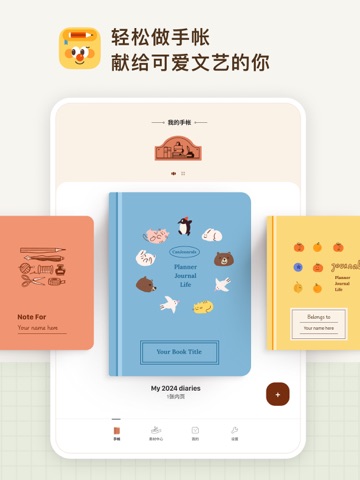
手帐罐头: “轻松做出漂亮手帐” 是的,手帐罐头主打的就是一个轻松做手帐 为什么我们会做这个APP? 记录生活中的点滴非常重要,而手帐是一个非常好的载体,相比单纯的日记,手帐可以承载更多的信息,并可以创作更漂亮的展现方式,但是传统的纸质手帐对于日常学习工作繁忙的人来说,总是花费的时间太多了,而且需要有很强的美术功底的人才能做出很好看的手帐,更不用说要准备很多素材。所以,我们想要做一款轻松做出漂亮手帐的电子手帐App,既要有丰富好看的模板,也要有灵活的自定义性,每天只需要上传一些日常的照片,简单写下日常记录,就能产出一篇篇精美的电子手帐。 罐头手帐怎么做手帐? 1. 通过模版快速做出好看的手帐 我们提供了很多精美漂亮的手帐模版,都是经过精心设计和排版的,手帐儿可以简单动动手指,写点东西,上传点图片,就能产出一一页漂亮的手帐 而且手帐罐头有很多好看的贴纸,胶带,都可以一键切换,创造无限的可能 2. 通过空白页自定义添加模块来做手帐 除了模版,我们还有另一个模式,即「空白页」模式,如果熟悉 Notion 或者飞书的朋友可…
App details
What you can learn from 手帐罐头: 日记,手账,排版助手,动物,温暖陪伴记录,暖暖
Every shipping app on the App Store has gone through the same decisions you're working through right now: which screenshot goes first, what caption sits over it, which device frame to show, what color the background should be. The 10 screenshots above are 手帐罐头: 日记,手账,排版助手,动物,温暖陪伴记录,暖暖's answers to those questions — they're public, they're real, and they made it through Apple's review.
What the numbers say: 手帐罐头: 日记,手账,排版助手,动物,温暖陪伴记录,暖暖 runs a light set where the background shifts from screenshot to screenshot (first shot #F4F4F4) — each image has to stand on its own, so the captions carry more of the story. The accent colour we picked up, #84B4D4, is the one to reuse for badges, arrows and highlighted words if you borrow this look. Hit Use this style to open the editor with these exact colours and drop your own screenshot in.
Notice the first screenshot in particular. It's the one users see in search results and on the product page, and it's where most apps spend their best caption and tightest design. Look at the proportion of background to phone, where the text sits, what one thing the image is trying to communicate.
Want to see how other Graphics & Design apps approach the same problem? Browse more Graphics & Design apps in the showcase.
Take what works into your own screenshots
Open LaunchShots and design your App Store & Google Play screenshots — pick a device frame, drop captions, ship in minutes. Free, in your browser.
Open the screenshot editor →Apps with a similar look
Closest background + accent colours among the listings we've analysed — useful when you want to see the same palette handled by a different team.