Chart position — tracked daily by LaunchShots
Screenshot style breakdown
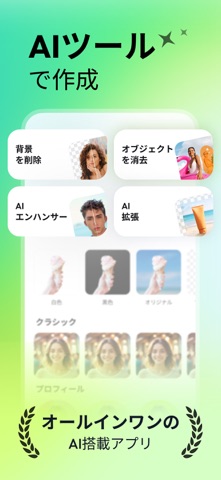
Sampled from 6 of AnyEraser: AIでオブジェクトを削除's App Store screenshots — background, accent and theme, measured by LaunchShots (not something Apple publishes).
#D4FCC4 bg
#BADDAC
#4CE4AC accent
#111111 text
Reading the caption text from the screenshots in your browser…
Screenshots


Icon palette
About this app
背景やオブジェクトの削除が超簡単&高速に! AnyEraserは、AIを使用して背景やオブジェクトを削除する究極の写真編集アプリです。特別な技術は不要で、タップひとつで不要な部分を消去し、クリアで美しい結果を楽しむことができます。 ** 主な特徴 ** - 背景削除 高度なAI技術を使用して、瞬時に写真を検出しカットアウト。透明な背景でのシームレスなPNGエクスポートをサポートします - 背景変更 1000種類以上の背景テンプレートを提供。プロフェッショナルな商品写真、ポートレート、観光地、ペット、空など、さまざまな背景から選んで、思い通りにクリエイティビティを発揮できます - オブジェクト削除 ブラシや投げ縄などのプロフェッショナルなツールを使用して、不要なオブジェクトや欠陥をピクセル単位の精度でシームレスに消去してください - スタイリッシュなフィルター 内なるアーティストを引き出し、鮮やかなフィルターを写真に適用。あなたのユニークなスタイルを反映した素晴らしいアートに写真を変身させます - 簡単なトリミング ソーシャル…
App details
What you can learn from AnyEraser: AIでオブジェクトを削除
Every shipping app on the App Store has gone through the same decisions you're working through right now: which screenshot goes first, what caption sits over it, which device frame to show, what color the background should be. The 10 screenshots above are AnyEraser: AIでオブジェクトを削除's answers to those questions — they're public, they're real, and they made it through Apple's review.
What the numbers say: AnyEraser: AIでオブジェクトを削除 runs a light set where the background shifts from screenshot to screenshot (first shot #D4FCC4) — each image has to stand on its own, so the captions carry more of the story. The accent colour we picked up, #4CE4AC, is the one to reuse for badges, arrows and highlighted words if you borrow this look. Hit Use this style to open the editor with these exact colours and drop your own screenshot in.
Notice the first screenshot in particular. It's the one users see in search results and on the product page, and it's where most apps spend their best caption and tightest design. Look at the proportion of background to phone, where the text sits, what one thing the image is trying to communicate.
Want to see how other Graphics & Design apps approach the same problem? Browse more Graphics & Design apps in the showcase.
Take what works into your own screenshots
Open LaunchShots and design your App Store & Google Play screenshots — pick a device frame, drop captions, ship in minutes. Free, in your browser.
Open the screenshot editor →Apps with a similar look
Closest background + accent colours among the listings we've analysed — useful when you want to see the same palette handled by a different team.