launchshots / showcase / reference / translate ai - live translate

Translate AI - Live Translate

Reference 4.3 (3,930) Free 4+ 172.5 MB

Chart position — tracked daily by LaunchShots

#6 of 100
Top Free Reference · Poland
best #6 · 15 days tracked · as of Sep 20
▲ 1 / 7d
#10 of 100
Top Free Reference · Germany
best #6 · 23 days tracked · as of Sep 20
▼ 1 / 7d
#11 of 100
Top Free Reference · Brazil
best #10 · 8 days tracked · as of Sep 15
— / 7d
#11 of 100
Top Free Reference · Japan
best #10 · 9 days tracked · as of Sep 19
▼ 1 / 7d
#13 of 100
Top Free Reference · Philippines
best #12 · 11 days tracked · as of Sep 16
▲ 5 / 7d
+ 20 more charts

Screenshot changes — detected by LaunchShots

Aug 31, 2026
Translate AI - Live Translate added 1 iPhone screenshot (9 → 10).
Aug 24, 2026
Translate AI - Live Translate added 3 iPhone screenshots (6 → 9); switched from a light to a mixed theme; moved to full-bleed screens without captions (was captions above the phone); changed the background colour from #FCFCFC to #04448C; started varying the background per screenshot.

Screenshot style breakdown

Sampled from 6 of Translate AI - Live Translate's App Store screenshots — background, accent and theme, measured by LaunchShots (not something Apple publishes).

Use this style →
10 iPhone screenshots · 10 iPad Mixed light / dark Background changes per screenshot
#04448C bg #275E9C #046CEC accent #FFFFFF text
vs. Reference apps we've analysed (1783): 43% use a light theme; 31% put the caption above the phone — Translate AI - Live Translate uses no captions; the average set has 6.1 screenshots — Translate AI - Live Translate ships 10. Full Reference benchmark →

Screenshots

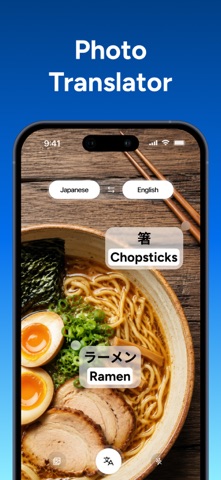
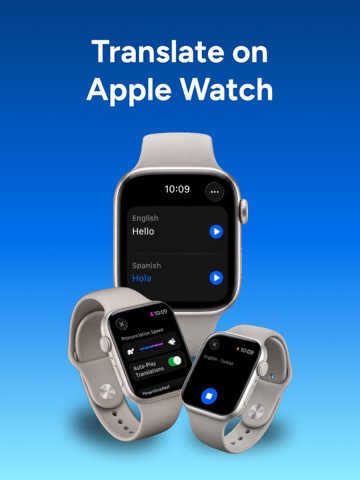
#1 Translate AI - Live Translate iPhone screenshot 1
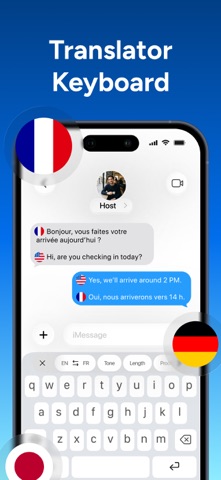
#2 Translate AI - Live Translate iPhone screenshot 2
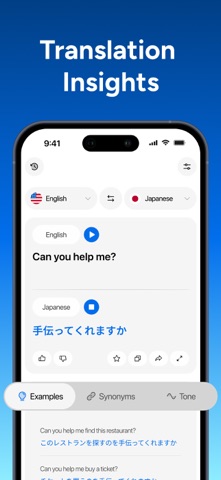
#3 Translate AI - Live Translate iPhone screenshot 3
#4 Translate AI - Live Translate iPhone screenshot 4
#5 Translate AI - Live Translate iPhone screenshot 5
#6 Translate AI - Live Translate iPhone screenshot 6
#7 Translate AI - Live Translate iPhone screenshot 7
#8 Translate AI - Live Translate iPhone screenshot 8
#9 Translate AI - Live Translate iPhone screenshot 9
#10 Translate AI - Live Translate iPhone screenshot 10

iPad screenshots

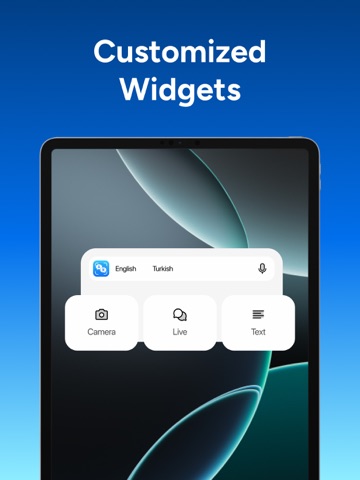
#1 Translate AI - Live Translate iPad screenshot 1
#2 Translate AI - Live Translate iPad screenshot 2
#3 Translate AI - Live Translate iPad screenshot 3
#4 Translate AI - Live Translate iPad screenshot 4
#5 Translate AI - Live Translate iPad screenshot 5
#6 Translate AI - Live Translate iPad screenshot 6
#7 Translate AI - Live Translate iPad screenshot 7
#8 Translate AI - Live Translate iPad screenshot 8
#9 Translate AI - Live Translate iPad screenshot 9
#10 Translate AI - Live Translate iPad screenshot 10

Icon palette

extracting…
Dominant colors sampled from the icon — click any swatch to copy the hex.

About this app

Translate text, voice, and camera content in 143+ languages including English, Spanish, French, German, Japanese, Chinese, Korean, and Arabic. Break language barriers with Translate AI - Live Translator, your all-in-one AI translator for text, voice, camera, photo, live conversations, and more. Whether you're traveling, working internationally, studying, or communicating across languages, Translate AI delivers fast, natural translations powered by advanced AI models for accurate, context-aware results. ▶ How can I translate live conversations instantly? Have natural two-way conversations with real-time AI voice translation. Speak, listen, and communicate effortlessly in 143+ languages; perfect for travel, meetings, and everyday conversations. ▶ How can I translate photos and live camera content? Snap a photo or point your camera to translate menus, signs, documents, labels, and other…

App details

Bundle ID
co.appnation.aivoicetranslator
Latest version
2.5.1
Released
Jan 30, 2025
Last updated
Sep 5, 2026
Languages
16 (AR, NL, EN, FR, DE…)
Genres
Reference, Productivity

What you can learn from Translate AI - Live Translate

Every shipping app on the App Store has gone through the same decisions you're working through right now: which screenshot goes first, what caption sits over it, which device frame to show, what color the background should be. The 20 screenshots above are Translate AI - Live Translate's answers to those questions — they're public, they're real, and they made it through Apple's review.

What the numbers say: Translate AI - Live Translate runs a mixed light-and-dark set where the background shifts from screenshot to screenshot (first shot #04448C) — each image has to stand on its own, so the captions carry more of the story. The accent colour we picked up, #046CEC, is the one to reuse for badges, arrows and highlighted words if you borrow this look. Hit Use this style to open the editor with these exact colours and drop your own screenshot in.

Notice the first screenshot in particular. It's the one users see in search results and on the product page, and it's where most apps spend their best caption and tightest design. Look at the proportion of background to phone, where the text sits, what one thing the image is trying to communicate.

Want to see how other Reference apps approach the same problem? Browse more Reference apps in the showcase.

Take what works into your own screenshots

Open LaunchShots and design your App Store & Google Play screenshots — pick a device frame, drop captions, ship in minutes. Free, in your browser.

Open the screenshot editor →

Apps with a similar look

Closest background + accent colours among the listings we've analysed — useful when you want to see the same palette handled by a different team.

Заправки 24
#04447C #0C74F4
Go with the Motability Scheme
#04447C #0464DC
uLIBRARY
#044C94 #1C74F4
Türk Telekom
#044C94 #0484DC
YOLO Calculator
#144C8C #0474DC
HTML Viewer: View Source
#044C9C #047CFC

More Reference apps

Latest from the blog

News
iOS Release Season Checklist: Update Your App Store Listing for iOS 17
Sep 20, 2026
ASO
Writing an App Store Description People Finish Reading
Sep 19, 2026
Guides
iPad Screenshots: When and How to Design Once for All
Sep 18, 2026
Tips
Onboarding Screens vs. Marketing Screenshots: Why They Differ
Sep 17, 2026
1 / 1
copied