Chart position — tracked daily by LaunchShots
Screenshot changes — detected by LaunchShots
Screenshot style breakdown
Sampled from 6 of AI画像生成・アニメイラストメーカー SUPPART's App Store screenshots — background, accent and theme, measured by LaunchShots (not something Apple publishes).
#24E4DC bg
#1FC8C1
#8CECEC accent
#111111 text
Screenshots




Icon palette
About this app
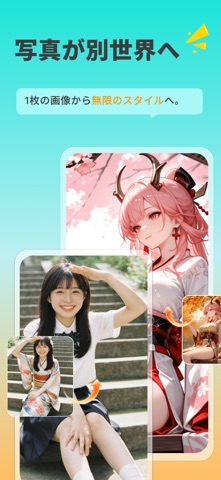
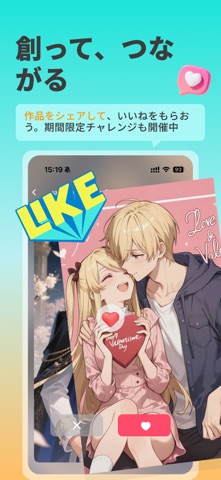
SUPPARTは、テキストを入力するだけで約10秒でAIイラストを生成できるAI画像生成アプリです。写真をアップロードすれば、アニメ風のアバター・似顔絵・アイコンに自動変換。150種類以上のスタイルから選べます。 ■ できること ・テキストからAIイラスト生成 — キーワードを入力するだけで数秒で完成 ・写真をアニメ化 — 自撮りをアニメ風の似顔絵・プロフアイコンに ・漫画・マンガ風イラスト ・待ち受け・壁紙・SNSアイコン・スタンプ作成 ・ファンアート、VTuber、オリジナルキャラ(推し活にも) ■ 150種類以上のスタイル アニメ、美少女、水彩、油絵、ピクセルアート、コスプレ風など、ワンタップで切り替え。新スタイルも続々追加。 ■ クリエイターコミュニティ&コンテスト ・作品を投稿してみんなにシェア ・お気に入りに投票 ・定期開催のコンテストで豪華賞品(限定グッズなど)をゲット ■ かんたん・高速 専門知識やお絵描きスキルは不要。スマホで入力してタップするだけ。新規ユーザーは無料で生成をお試しできます。 あなただけのAIイラスト・アバター…
App details
What you can learn from AI画像生成・アニメイラストメーカー SUPPART
Every shipping app on the App Store has gone through the same decisions you're working through right now: which screenshot goes first, what caption sits over it, which device frame to show, what color the background should be. The 7 screenshots above are AI画像生成・アニメイラストメーカー SUPPART's answers to those questions — they're public, they're real, and they made it through Apple's review.
What the numbers say: AI画像生成・アニメイラストメーカー SUPPART runs a light set with one background colour (#24E4DC) carried across every screenshot — the listing reads as a single poster when the shots sit side by side in search results. The accent colour we picked up, #8CECEC, is the one to reuse for badges, arrows and highlighted words if you borrow this look. Hit Use this style to open the editor with these exact colours and drop your own screenshot in.
Notice the first screenshot in particular. It's the one users see in search results and on the product page, and it's where most apps spend their best caption and tightest design. Look at the proportion of background to phone, where the text sits, what one thing the image is trying to communicate.
Want to see how other Graphics & Design apps approach the same problem? Browse more Graphics & Design apps in the showcase.
Take what works into your own screenshots
Open LaunchShots and design your App Store & Google Play screenshots — pick a device frame, drop captions, ship in minutes. Free, in your browser.
Open the screenshot editor →Apps with a similar look
Closest background + accent colours among the listings we've analysed — useful when you want to see the same palette handled by a different team.