Chart position — tracked daily by LaunchShots
Screenshot style breakdown
Sampled from 6 of GoVola – Voli economici's App Store screenshots — background, accent and theme, measured by LaunchShots (not something Apple publishes).
#043C74 bg
#275787
#248CDC accent
#FFFFFF text
Screenshots



Icon palette
About this app
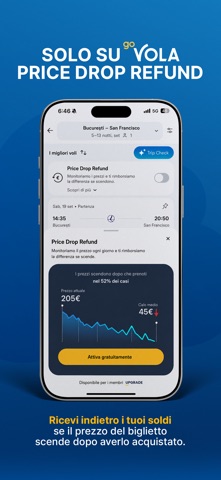
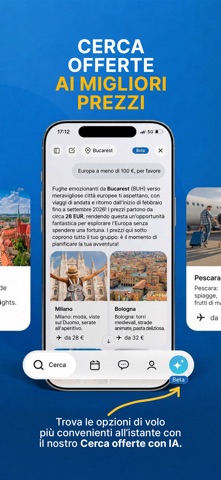
Pronto a trovare le migliori offerte di voli e hotel in pochi secondi? GoVola usa l'IA per setacciare il web e farti risparmiare tempo e denaro: confronta le tariffe di più compagnie aeree e hotel e ti mostra le migliori opzioni per il tuo viaggio. Il nostro obiettivo è eliminare la confusione sui prezzi dei voli e offrirti scelte di viaggio affidabili, con una prenotazione semplice dall'inizio alla fine. Cerca, confronta e prenota voli di compagnie come Wizz Air, Ryanair, Lufthansa, Air France, easyJet, KLM, ITA Airways e molte altre. E se il prezzo del tuo biglietto scende dopo la prenotazione, Price Drop Refund ti rimborsa la differenza. L'app è pensata per chi viaggia con un occhio al rapporto qualità-prezzo, vuole un'esperienza di prenotazione fluida e senza complicazioni e cerca offerte eccezionali. Creata da viaggiatori, per viaggiatori. Funzioni esclusive nell'app Conf…
App details
What you can learn from GoVola – Voli economici
Every shipping app on the App Store has gone through the same decisions you're working through right now: which screenshot goes first, what caption sits over it, which device frame to show, what color the background should be. The 6 screenshots above are GoVola – Voli economici's answers to those questions — they're public, they're real, and they made it through Apple's review.
What the numbers say: GoVola – Voli economici runs a dark set where the background shifts from screenshot to screenshot (first shot #043C74) — each image has to stand on its own, so the captions carry more of the story. The accent colour we picked up, #248CDC, is the one to reuse for badges, arrows and highlighted words if you borrow this look. Hit Use this style to open the editor with these exact colours and drop your own screenshot in.
Notice the first screenshot in particular. It's the one users see in search results and on the product page, and it's where most apps spend their best caption and tightest design. Look at the proportion of background to phone, where the text sits, what one thing the image is trying to communicate.
Want to see how other Travel apps approach the same problem? Browse more Travel apps in the showcase.
Take what works into your own screenshots
Open LaunchShots and design your App Store & Google Play screenshots — pick a device frame, drop captions, ship in minutes. Free, in your browser.
Open the screenshot editor →Apps with a similar look
Closest background + accent colours among the listings we've analysed — useful when you want to see the same palette handled by a different team.