Chart position — tracked daily by LaunchShots
Screenshot style breakdown
Sampled from 5 of 广交会供应商's App Store screenshots — background, accent and theme, measured by LaunchShots (not something Apple publishes).
#FCFCFC bg
#DDDDDD
#8C2414 accent
#111111 text
Screenshots


iPad screenshots


Icon palette
About this app
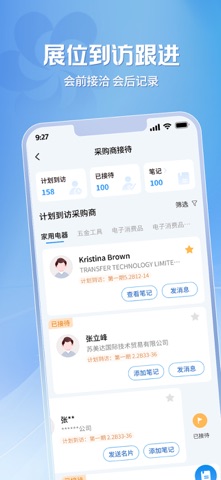
【主要功能】 1.参展服务 办理参展证件,获取最新大会消息通知,查询馆内服务信息;展前、展中、展后服务信息全覆盖。 2.店铺管理 上传精彩短视频,增加产品与店铺曝光度,获取更多推流;上传产品图册,吸引更多意向客户;管理产品状态,随时随地掌握店铺动态。 3.采购商接待与笔记 提前获取采购商到访信息,提前与客户建立联系;新增AI笔记功能,智能总结洽谈笔记,展后高效复盘核心信息。 4.名片扫码交换 使用广交会APP扫描采购商证件或名片码,交换名片即刻获取商机。告别纸质名片,轻松进行客户管理。 5.全球贸易配对 汇聚全球优质采购商,轻松拓展国际市场;精准匹配采购需求,对接过程高效透明。 6.数据看板 实时呈现店铺核心数据,帮助供应商精准掌握运营效果。
App details
What you can learn from 广交会供应商
Every shipping app on the App Store has gone through the same decisions you're working through right now: which screenshot goes first, what caption sits over it, which device frame to show, what color the background should be. The 8 screenshots above are 广交会供应商's answers to those questions — they're public, they're real, and they made it through Apple's review.
What the numbers say: 广交会供应商 runs a light set with one background colour (#FCFCFC) carried across every screenshot — the listing reads as a single poster when the shots sit side by side in search results. The accent colour we picked up, #8C2414, is the one to reuse for badges, arrows and highlighted words if you borrow this look. Hit Use this style to open the editor with these exact colours and drop your own screenshot in.
Notice the first screenshot in particular. It's the one users see in search results and on the product page, and it's where most apps spend their best caption and tightest design. Look at the proportion of background to phone, where the text sits, what one thing the image is trying to communicate.
Want to see how other Shopping apps approach the same problem? Browse more Shopping apps in the showcase.
Take what works into your own screenshots
Open LaunchShots and design your App Store & Google Play screenshots — pick a device frame, drop captions, ship in minutes. Free, in your browser.
Open the screenshot editor →Apps with a similar look
Closest background + accent colours among the listings we've analysed — useful when you want to see the same palette handled by a different team.