Chart position — tracked daily by LaunchShots
Screenshot style breakdown
Sampled from 5 of TRIAL公式アプリ TRIAL+(トライアルプラス)'s App Store screenshots — background, accent and theme, measured by LaunchShots (not something Apple publishes).
#043C74 bg
#275787
#FCE404 accent
#FFFFFF text
Screenshots



Icon palette
About this app
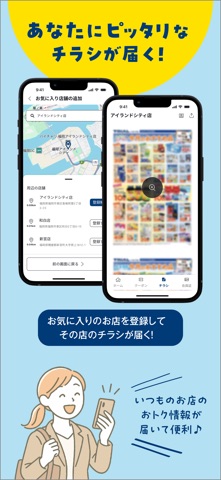
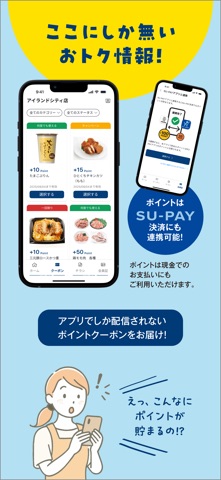
TRIALから新しいお買い物アプリが登場しました! お買い物をもっとお得に、もっと賢く! 普段お使いのお店を「お気に入り店舗」に登録して、 チラシやクーポンをいち早くご確認頂けます! 他にも、暮らしに便利なヒントがたくさんあります! このアプリのオススメポイント! ・アプリで見つけたクーポンで、お得にポイントをゲット! ・最新のセール情報やチラシで、お買い得商品をご確認頂けます! 【クーポンご利用方法】 1.お気に入り店舗を登録 2.お好きなクーポン下部の「選択する」ボタンを押下。 3.クーポン下部が「選択済み」となった、対象商品を店頭で購入。 ※個別の条件につきましては、クーポン詳細をご確認下さい。 4.以上でクーポンポイントが取得出来ます。 ※ポイントは、お買い物の翌日にご確認頂くことが出来ます。
App details
What you can learn from TRIAL公式アプリ TRIAL+(トライアルプラス)
Every shipping app on the App Store has gone through the same decisions you're working through right now: which screenshot goes first, what caption sits over it, which device frame to show, what color the background should be. The 5 screenshots above are TRIAL公式アプリ TRIAL+(トライアルプラス)'s answers to those questions — they're public, they're real, and they made it through Apple's review.
What the numbers say: TRIAL公式アプリ TRIAL+(トライアルプラス) runs a mixed light-and-dark set where the background shifts from screenshot to screenshot (first shot #043C74) — each image has to stand on its own, so the captions carry more of the story. The accent colour we picked up, #FCE404, is the one to reuse for badges, arrows and highlighted words if you borrow this look. Hit Use this style to open the editor with these exact colours and drop your own screenshot in.
Notice the first screenshot in particular. It's the one users see in search results and on the product page, and it's where most apps spend their best caption and tightest design. Look at the proportion of background to phone, where the text sits, what one thing the image is trying to communicate.
Want to see how other Lifestyle apps approach the same problem? Browse more Lifestyle apps in the showcase.
Take what works into your own screenshots
Open LaunchShots and design your App Store & Google Play screenshots — pick a device frame, drop captions, ship in minutes. Free, in your browser.
Open the screenshot editor →Apps with a similar look
Closest background + accent colours among the listings we've analysed — useful when you want to see the same palette handled by a different team.