Chart position — tracked daily by LaunchShots
Screenshot changes — detected by LaunchShots
Screenshot style breakdown
Sampled from 5 of DIRECT Reads's App Store screenshots — background, accent and theme, measured by LaunchShots (not something Apple publishes).
#F4645C bg
#F57972
#7C343C accent
#FFFFFF text
Screenshots




iPad screenshots


Icon palette
About this app
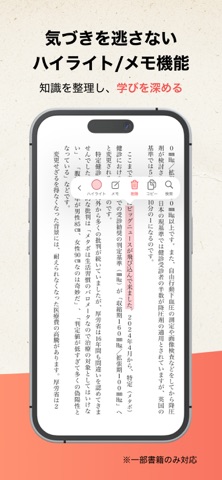
【機能説明】 ■気づきを逃さないハイライト機能 ・気になる一文をワンタップでハイライト ・ハイライトは自動で「マイノート」に整理され、あとから振り返りやすい ■読みたい本がすぐに見つかる本棚 ・並び替えや検索で、目的の一冊へすぐアクセス ・カテゴリー/著者/読書ステータスで絞り込み可能 ・グリッド表示とリスト表示の切り替えに対応 ■読みやすさを追求した読書画面 ・目次やページ指定でスムーズに移動 ・文字サイズを自由に調整可能 ・シンプルで見やすさにこだわったUI設計 ■いつでも、どこでも、快適に ・ダウンロードしてオフラインでも読書可能 ・Wi-Fi接続時のみダウンロードする設定にも対応 ・移動中やスキマ時間でもストレスなく読書を楽しめる DIRECT Readsは、読むことに集中できる、シンプルで快適な読書体験を提供します。 今後のアップデートで、さらに機能を拡充予定です。 ※一部の端末・環境では、ご利用いただけない場合があります
App details
What you can learn from DIRECT Reads
Every shipping app on the App Store has gone through the same decisions you're working through right now: which screenshot goes first, what caption sits over it, which device frame to show, what color the background should be. The 10 screenshots above are DIRECT Reads's answers to those questions — they're public, they're real, and they made it through Apple's review.
What the numbers say: DIRECT Reads runs a mixed light-and-dark set where the background shifts from screenshot to screenshot (first shot #F4645C) — each image has to stand on its own, so the captions carry more of the story. The accent colour we picked up, #7C343C, is the one to reuse for badges, arrows and highlighted words if you borrow this look. Hit Use this style to open the editor with these exact colours and drop your own screenshot in.
Notice the first screenshot in particular. It's the one users see in search results and on the product page, and it's where most apps spend their best caption and tightest design. Look at the proportion of background to phone, where the text sits, what one thing the image is trying to communicate.
Want to see how other Book apps approach the same problem? Browse more Book apps in the showcase.
Take what works into your own screenshots
Open LaunchShots and design your App Store & Google Play screenshots — pick a device frame, drop captions, ship in minutes. Free, in your browser.
Open the screenshot editor →Apps with a similar look
Closest background + accent colours among the listings we've analysed — useful when you want to see the same palette handled by a different team.