Chart position — tracked daily by LaunchShots
Screenshot style breakdown
Sampled from 6 of 此间herein - 创意解压鱼缸·可爱天气·艺术日历's App Store screenshots — background, accent and theme, measured by LaunchShots (not something Apple publishes).
#6CB4FC bg
#5F9EDD
#048CFC accent
#111111 text
Screenshots


Icon palette
About this app
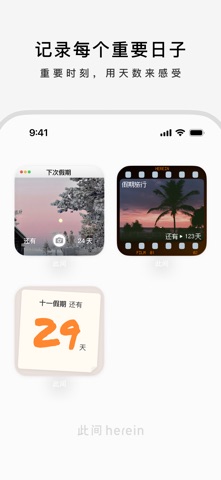
欢迎来到「此间」,一个让你在数字世界里,布置一个完全属于自己的角落。 我们相信,手机桌面不应只是冰冷的工具集合,更可以是一个充满温度、能够安放情绪的私人空间。在这里,你可以逃离喧嚣,静静地看着一个微缩世界,享受片刻的放空与心流。 【打造你的创意角落】 · 鱼缸温度:你可以用一个简约的玻璃鱼缸展示天气,在学习工作的间隙前来摸鱼、解压 · 名画天气:在手机桌面开一间「天气美术馆」,每当你看天气,都像忙里偷闲看了一场小小展览 · 语言闪卡:点一点就翻面,背单词变得和抽卡游戏一样好玩 · 可爱天气:用一个可爱的笑脸太阳,开启新的一天 【记录你的灵感与日常】 · 一言:每日为你推送一句或触动心灵或奇思妙想的文案,成为你灵感的源泉。也可以记录和展示一句对你重要的话,提醒并激励自己 · 日子:无论是考研倒计时,还是重要的纪念日,用最具创意的方式在桌面上进行追踪,让每一个重要时刻都充满仪式感 【定义你的专属美学风格】我们提供多种独特的风格组件,让你的角落与众不同: · 可爱 & 趣味:用萌系的元素和有趣的互动,打造一个充满活力…
App details
What you can learn from 此间herein - 创意解压鱼缸·可爱天气·艺术日历
Every shipping app on the App Store has gone through the same decisions you're working through right now: which screenshot goes first, what caption sits over it, which device frame to show, what color the background should be. The 6 screenshots above are 此间herein - 创意解压鱼缸·可爱天气·艺术日历's answers to those questions — they're public, they're real, and they made it through Apple's review.
What the numbers say: 此间herein - 创意解压鱼缸·可爱天气·艺术日历 runs a light set where the background shifts from screenshot to screenshot (first shot #6CB4FC) — each image has to stand on its own, so the captions carry more of the story. The accent colour we picked up, #048CFC, is the one to reuse for badges, arrows and highlighted words if you borrow this look. Hit Use this style to open the editor with these exact colours and drop your own screenshot in.
Notice the first screenshot in particular. It's the one users see in search results and on the product page, and it's where most apps spend their best caption and tightest design. Look at the proportion of background to phone, where the text sits, what one thing the image is trying to communicate.
Want to see how other Graphics & Design apps approach the same problem? Browse more Graphics & Design apps in the showcase.
Take what works into your own screenshots
Open LaunchShots and design your App Store & Google Play screenshots — pick a device frame, drop captions, ship in minutes. Free, in your browser.
Open the screenshot editor →Apps with a similar look
Closest background + accent colours among the listings we've analysed — useful when you want to see the same palette handled by a different team.