Chart position — tracked daily by LaunchShots
Screenshot changes — detected by LaunchShots
Screenshot style breakdown
Sampled from 6 of フィットリア|1日1分からの楽しい運動習慣's App Store screenshots — background, accent and theme, measured by LaunchShots (not something Apple publishes).
#F49404 bg
#D68203
#FCC46C accent
#111111 text
Screenshots




Icon palette
About this app
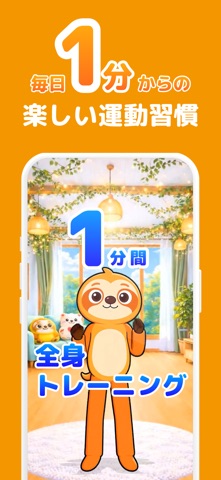
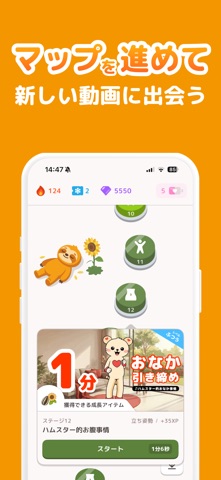
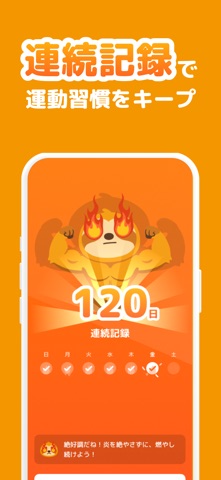
キャラクターと一緒に、1日1分から始める運動習慣! Instagram・TikTokで累計800万回以上再生されたトレーニング動画をアプリで体験。 かわいいキャラクターと一緒に、自宅で気軽に体を動かしましょう。 【フィットリアとは】 フィットリアは、キャラクターのトレーニング動画を見ながら楽しく運動できるフィットネスアプリです。 1回数分のスキマトレーニングだから、忙しい日でも気軽に運動。 自宅やスキマ時間に、短時間で体を動かすことができます。 日々の運動でキャラクターが成長。 ゲーム感覚で続けながら、自然と運動習慣が身につきます。 【アプリの特徴】 ■ Instagram・TikTokで話題のトレーニング動画 累計800万回以上再生されたキャラクター動画で楽しく運動。 ■ 1日1分から始められるスキマフィットネス 短時間のトレーニングだから、スキマ時間でも気軽に体を動かせます。 ■ マップを進めてトレーニング ステージをクリアしながら、少しずつトレーニングを進められます。 ■ キャラクター育成 トレーニングでプロテインや成長アイテムを獲得…
App details
What you can learn from フィットリア|1日1分からの楽しい運動習慣
Every shipping app on the App Store has gone through the same decisions you're working through right now: which screenshot goes first, what caption sits over it, which device frame to show, what color the background should be. The 8 screenshots above are フィットリア|1日1分からの楽しい運動習慣's answers to those questions — they're public, they're real, and they made it through Apple's review.
What the numbers say: フィットリア|1日1分からの楽しい運動習慣 runs a light set with one background colour (#F49404) carried across every screenshot — the listing reads as a single poster when the shots sit side by side in search results. The accent colour we picked up, #FCC46C, is the one to reuse for badges, arrows and highlighted words if you borrow this look. Hit Use this style to open the editor with these exact colours and drop your own screenshot in.
Notice the first screenshot in particular. It's the one users see in search results and on the product page, and it's where most apps spend their best caption and tightest design. Look at the proportion of background to phone, where the text sits, what one thing the image is trying to communicate.
Want to see how other Health & Fitness apps approach the same problem? Browse more Health & Fitness apps in the showcase.
Take what works into your own screenshots
Open LaunchShots and design your App Store & Google Play screenshots — pick a device frame, drop captions, ship in minutes. Free, in your browser.
Open the screenshot editor →Apps with a similar look
Closest background + accent colours among the listings we've analysed — useful when you want to see the same palette handled by a different team.