launchshots / showcase / health & fitness / restortrain: ai coach

RestOrTrain: AI Coach

by RESTORTRAIN SP Z O O
Health & Fitness ★ 4.9 (221) Free 12+ 44 MB

Chart position — tracked daily by LaunchShots

#98 of 100
Top Free Health & Fitness · Philippines
best #98 · 1 day tracked · as of Oct 29
— / 7d
#100 of 100
Top Free Health & Fitness · South Africa
best #75 · 8 days tracked · as of Nov 14
— / 7d

Screenshot changes — detected by LaunchShots

Nov 20, 2026
RestOrTrain: AI Coach removed 1 iPhone screenshot (7 → 6); changed the accent colour from #EC5454 to #74347C. →
Nov 10, 2026
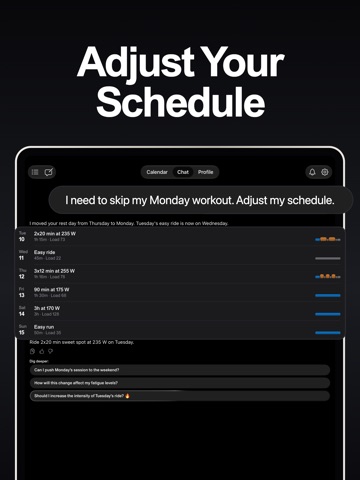
RestOrTrain: AI Coach removed 2 iPhone screenshots (9 → 7); switched from a light to a dark theme; moved to captions above the phone (was full-bleed screens without captions); changed the background colour from #649CD4 to #0C0C0C; changed the accent colour from #544C24 to #EC5454; unified every screenshot on one background colour. →
Aug 26, 2026
RestOrTrain: AI Coach added 3 iPhone screenshots (6 → 9). →

Screenshot style breakdown

Sampled from 6 of RestOrTrain: AI Coach's App Store screenshots — background, accent and theme, measured by LaunchShots (not something Apple publishes).

Use this style →
6 iPhone screenshots · 6 iPad Dark theme One background colour across the set
#0C0C0C bg #2E2E2E #74347C accent #FFFFFF text

Reading the caption text from the screenshots in your browser…

vs. Health & Fitness apps we've analysed (2869): 51% use a light theme — RestOrTrain: AI Coach goes dark; 42% put the caption above the phone (same here); the average set has 6.5 screenshots. Full Health & Fitness benchmark →

Screenshots

#1 RestOrTrain: AI Coach iPhone screenshot 1
#2 RestOrTrain: AI Coach iPhone screenshot 2
#3 RestOrTrain: AI Coach iPhone screenshot 3
#4 RestOrTrain: AI Coach iPhone screenshot 4
#5 RestOrTrain: AI Coach iPhone screenshot 5
#6 RestOrTrain: AI Coach iPhone screenshot 6

iPad screenshots

#1 RestOrTrain: AI Coach iPad screenshot 1
#2 RestOrTrain: AI Coach iPad screenshot 2
#3 RestOrTrain: AI Coach iPad screenshot 3
#4 RestOrTrain: AI Coach iPad screenshot 4
#5 RestOrTrain: AI Coach iPad screenshot 5
#6 RestOrTrain: AI Coach iPad screenshot 6

Icon palette

extracting…
Dominant colors sampled from the icon — click any swatch to copy the hex.

About this app

AI that thinks about your training, from individual activities to your entire fitness history. Terms of Use: https://restortrain.com/terms Privacy Policy: https://restortrain.com/privacy

App details

Bundle ID
com.michalmichalik.Rest-Or-Train
Latest version
2.2.8
Released
Oct 9, 2025
Last updated
Nov 19, 2026
Languages
10 (NL, EN, FR, DE, IT…)
Genres
Health & Fitness, Sports

What you can learn from RestOrTrain: AI Coach

Every shipping app on the App Store has gone through the same decisions you're working through right now: which screenshot goes first, what caption sits over it, which device frame to show, what color the background should be. The 12 screenshots above are RestOrTrain: AI Coach's answers to those questions — they're public, they're real, and they made it through Apple's review.

What the numbers say: RestOrTrain: AI Coach runs a dark set with one background colour (#0C0C0C) carried across every screenshot — the listing reads as a single poster when the shots sit side by side in search results. The accent colour we picked up, #74347C, is the one to reuse for badges, arrows and highlighted words if you borrow this look. Hit Use this style to open the editor with these exact colours and drop your own screenshot in.

Notice the first screenshot in particular. It's the one users see in search results and on the product page, and it's where most apps spend their best caption and tightest design. Look at the proportion of background to phone, where the text sits, what one thing the image is trying to communicate.

Want to see how other Health & Fitness apps approach the same problem? Browse more Health & Fitness apps in the showcase.

Take what works into your own screenshots

Open LaunchShots and design your App Store & Google Play screenshots — pick a device frame, drop captions, ship in minutes. Free, in your browser.

Open the screenshot editor →

Apps with a similar look

Closest background + accent colours among the listings we've analysed — useful when you want to see the same palette handled by a different team.

Ready For Play
#0C0C14 #6C348C
Promora - AI Prompt Generator
#0C0C14 #6C4474
Letrero LED Scroller Banner
#040404 #6C2C7C
Tape: Music Player
#0C0C14 #64348C
Onyx - Sports Picks
#0C0C0C #6C4C84
Lok Luk : Movie Event & TV
#0C0C14 #5C3484

More Health & Fitness apps

Latest from the blog

ASO
Google Play Promotional Content: Setup and Assets for In-App Events
Nov 23, 2026
Guides
Configuring Game Center in App Store Connect: Leaderboards and Achievements
Nov 22, 2026
News
Google Play Financial Features Declaration: Avoid Suspensions
Nov 21, 2026
Guides
iOS & Android App Accessibility Guide for Indie Developers
Nov 20, 2026
1 / 1
copied