Chart position — tracked daily by LaunchShots
Screenshot changes — detected by LaunchShots
Screenshot style breakdown
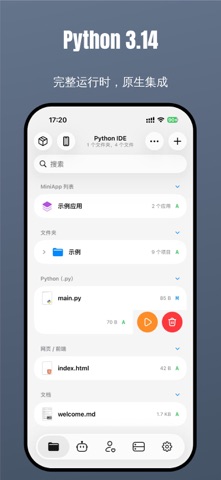
Sampled from 6 of PythonIDE's App Store screenshots — background, accent and theme, measured by LaunchShots (not something Apple publishes).
#64748C bg
#79879C
#FC8C2C accent
#FFFFFF text
Reading the caption text from the screenshots in your browser…
Screenshots


iPad screenshots


Icon palette
About this app
PythonIDE 是面向 iPhone 与 iPad 的本地 Python 与 Web 开发工作台。你可以运行 Python 3.14.7,创建 HTML/CSS/JavaScript 多文件项目,并将代码扩展为 Notebook、原生 MiniApp、小组件和自动化工作流。 【HTML / CSS / JavaScript】 • 编辑 HTML、CSS 与 JavaScript 多文件项目 • HTML/CSS 支持离线智能补全、格式化和相对资源路径补全 • 即时预览网页和样式,并加载本地图片、脚本及其他项目资源 • 在内置控制台查看 console 输出、资源加载、Promise 与 fetch 错误 【Python 开发与调试】 • 在设备本地运行 Python 3.14.7 • 支持交互式输入、运行参数、ANSI/Rich、图片与图表输出 • 使用断点、单步执行、调用栈和变量查看器调试代码 • 使用内置科学计算与开发库,并从 PyPI 安装兼容的纯 Python 包 【AI Agent】 • 让 Agent 理解项目上下文、创建或修改文件、运行代码并依据错误继续修复 • Git、SSH、网页和原生工具调用受权限与确认策略控制 【Notebook 与原生 MiniApp】 • 打开和编辑 .ipynb,运行单元格并显示 Markdown、HTML、图片和图表输出 • 使用 Pyth…
App details
What you can learn from PythonIDE
Every shipping app on the App Store has gone through the same decisions you're working through right now: which screenshot goes first, what caption sits over it, which device frame to show, what color the background should be. The 20 screenshots above are PythonIDE's answers to those questions — they're public, they're real, and they made it through Apple's review.
What the numbers say: PythonIDE runs a dark set where the background shifts from screenshot to screenshot (first shot #64748C) — each image has to stand on its own, so the captions carry more of the story. The accent colour we picked up, #FC8C2C, is the one to reuse for badges, arrows and highlighted words if you borrow this look. Hit Use this style to open the editor with these exact colours and drop your own screenshot in.
Notice the first screenshot in particular. It's the one users see in search results and on the product page, and it's where most apps spend their best caption and tightest design. Look at the proportion of background to phone, where the text sits, what one thing the image is trying to communicate.
Want to see how other Developer Tools apps approach the same problem? Browse more Developer Tools apps in the showcase.
Take what works into your own screenshots
Open LaunchShots and design your App Store & Google Play screenshots — pick a device frame, drop captions, ship in minutes. Free, in your browser.
Open the screenshot editor →Apps with a similar look
Closest background + accent colours among the listings we've analysed — useful when you want to see the same palette handled by a different team.