Chart position — tracked daily by LaunchShots
Screenshot changes — detected by LaunchShots
Screenshot style breakdown
Sampled from 6 of Boya OS's App Store screenshots — background, accent and theme, measured by LaunchShots (not something Apple publishes).
#E4ECFC bg
#C8CFDD
#6454F4 accent
#111111 text
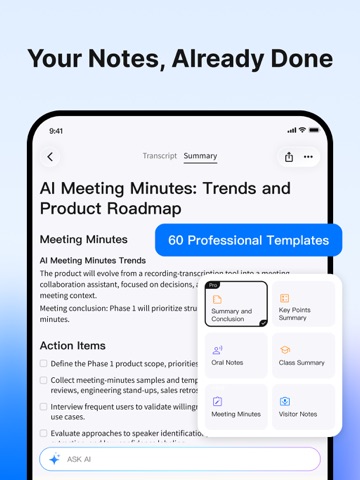
- #1mily: example, by automaticall, ly: Hello ; to do what, when it should be completed, and
- #2\ F One-Tap Highlighting Key Points Marked. View Them After
- #3assistant, foc | Summary and Key Points. risks, and crc | Conclusion Summary Meeting con:
- #4schedule review Define the three Phase 1 focus areas for the Al recommendation feature: de
- #5Al Meeting Minutes Trends Pollect samples and template needs mot valuate speaker ID, struc
- #6lh] Export Audio ¢ Export Transcript B Export Summary
Captions read from the screenshots (OCR, may contain small errors): 6 headlines, 13.2 words on average (longest 16).
Screenshots


iPad screenshots




Icon palette
About this app
Boya OS: Audio Transcription & Summaries Boya OS is an intelligent audio recording, transcription, and translation app developed by Boya, It is designed for multilingual meetings, interviews, speeches, and content documentation. With powerful speech recognition and natural language processing, BOYA Notra transforms recordings into accurate transcripts and automatically generates structured summaries, significantly improving the usability and efficiency of recorded audio. Key Feature • Summaries: Automatically extracts key information and generates clear, structured meeting notes and concise highlights. Ideal Use Cases • Recording and summarization of business meetings • Organizing interviews, lectures, and spoken content • Multilingual communication and international collaboration • Video creation, podcast transcription, and subtitle generation By deeply integrating professional-gr…
App details
What you can learn from Boya OS
Every shipping app on the App Store has gone through the same decisions you're working through right now: which screenshot goes first, what caption sits over it, which device frame to show, what color the background should be. The 14 screenshots above are Boya OS's answers to those questions — they're public, they're real, and they made it through Apple's review.
What the numbers say: Boya OS runs a light set with one background colour (#E4ECFC) carried across every screenshot — the listing reads as a single poster when the shots sit side by side in search results. The accent colour we picked up, #6454F4, is the one to reuse for badges, arrows and highlighted words if you borrow this look. Hit Use this style to open the editor with these exact colours and drop your own screenshot in.
Notice the first screenshot in particular. It's the one users see in search results and on the product page, and it's where most apps spend their best caption and tightest design. Look at the proportion of background to phone, where the text sits, what one thing the image is trying to communicate.
Want to see how other Developer Tools apps approach the same problem? Browse more Developer Tools apps in the showcase.
Take what works into your own screenshots
Open LaunchShots and design your App Store & Google Play screenshots — pick a device frame, drop captions, ship in minutes. Free, in your browser.
Open the screenshot editor →Apps with a similar look
Closest background + accent colours among the listings we've analysed — useful when you want to see the same palette handled by a different team.