Chart position — tracked daily by LaunchShots
Screenshot changes — detected by LaunchShots
Screenshot style breakdown
Sampled from 6 of CalJimi-热量计算卡路里饮食记录体重管理拍照识别打卡's App Store screenshots — background, accent and theme, measured by LaunchShots (not something Apple publishes).
#FCFCFC bg
#DDDDDD
#14AC3C accent
#111111 text
Reading the caption text from the screenshots in your browser…
Screenshots




Icon palette
About this app
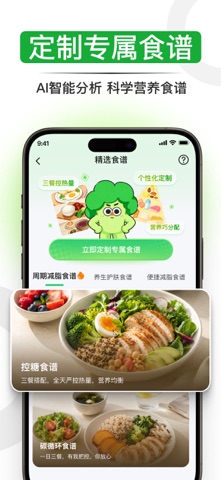
CalJimi是一款专为“饮食管理、减脂减重、健身塑形、健康生活”人群打造的全能型智能热量助手。我们为你精心设计了懂你、贴心、有温度的个性化AI健康搭子,TA不仅是你的科学饮食伙伴,更是陪你记录、鼓励你坚持、与你一同成长的满分健康搭档! 【AI 搭子・聊天轻松记饮食】 专属 AI 伙伴暖心陪伴,支持文字、语音随时聊饮食。AI 主动提取食物信息,信息模糊时会贴心追问,记录自动同步至饮食日志,让坚持记录像聊天一样自然。 【拍照即识别・秒知营养与热量】 随手一拍,快速识别食物种类,并精准测算热量、碳水、蛋白质、脂肪等营养数据,告别手动查找,让饮食管理更直观、更轻松。 【外卖锁・管住冲动点单】 开启外卖锁,当你当日热量摄入达到目标上限,自动锁住外卖 App,阻断冲动下单。克制食欲,不再一不小心超额摄入,减脂自控更简单。 【每日热量・智能规划与提醒】 根据你的身体数据与健康目标,自动生成每日热量摄入计划。早晨推送当日目标,餐后更新剩余额度,超标及时提醒,帮你科学把控每一餐。 【个性食谱・量身推荐健康餐单】 基于你…
App details
What you can learn from CalJimi-热量计算卡路里饮食记录体重管理拍照识别打卡
Every shipping app on the App Store has gone through the same decisions you're working through right now: which screenshot goes first, what caption sits over it, which device frame to show, what color the background should be. The 10 screenshots above are CalJimi-热量计算卡路里饮食记录体重管理拍照识别打卡's answers to those questions — they're public, they're real, and they made it through Apple's review.
What the numbers say: CalJimi-热量计算卡路里饮食记录体重管理拍照识别打卡 runs a light set with one background colour (#FCFCFC) carried across every screenshot — the listing reads as a single poster when the shots sit side by side in search results. The accent colour we picked up, #14AC3C, is the one to reuse for badges, arrows and highlighted words if you borrow this look. Hit Use this style to open the editor with these exact colours and drop your own screenshot in.
Notice the first screenshot in particular. It's the one users see in search results and on the product page, and it's where most apps spend their best caption and tightest design. Look at the proportion of background to phone, where the text sits, what one thing the image is trying to communicate.
Want to see how other Health & Fitness apps approach the same problem? Browse more Health & Fitness apps in the showcase.
Take what works into your own screenshots
Open LaunchShots and design your App Store & Google Play screenshots — pick a device frame, drop captions, ship in minutes. Free, in your browser.
Open the screenshot editor →Apps with a similar look
Closest background + accent colours among the listings we've analysed — useful when you want to see the same palette handled by a different team.