Screenshots




Icon palette
About this app
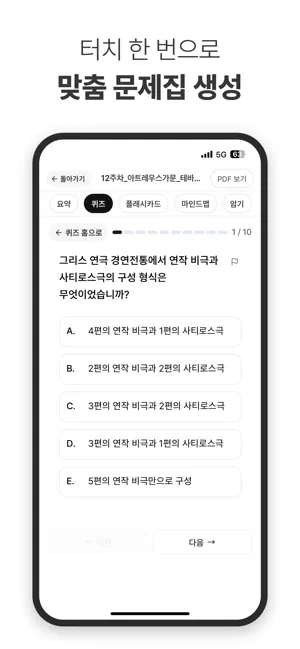
대학생 시험 공부, 이제 ‘정리’ 말고 ‘집중’하세요. 유니브 AI는 PDF 하나로 요약·퀴즈·AI 튜터, 메모까지 제공하는 AI 기반 학습 도우미입니다. 주요 기능 PDF 요약 • PDF를 업로드하면 AI가 자동으로 핵심 내용을 정리합니다. 필요한 부분만 빠르게 복습하며 시간을 절약하세요. 무제한 퀴즈 생성 • AI가 개념·기출 중심으로 문제를 자동 생성합니다. 시험 전 벼락치기 복습에도 완벽하게 활용할 수 있습니다. AI 튜터 • 모르는 개념을 질문하면 AI가 바로 설명해줍니다. 교재보다 빠르고, 검색보다 정확한 학습 파트너입니다. 핵심 개념 정리 노트 • AI가 자동으로 중요 포인트만 모아 공부할 때 한눈에 정리된 개념을 확인할 수 있습니다. 이런 분께 추천합니다 • 시험이 얼마 남지 않은 대학생 빠른 요약과 퀴즈로 단기 벼락치기 완벽 대비 • PDF가 너무 많아 다 보기 버거운 학생 AI가 자동으로 핵심만 추려 정리 • 마지막으로 퀴즈 풀며 점검하고 싶은 학생 실제 시험처럼 문제를 풀며 복습 유니브 AI가 바꾸는 공부 방식 PDF 업로드 → 요약 생…
App details
What you can learn from 유니브 AI – PDF 요약, 퀴즈, AI 튜터
Every shipping app on the App Store has gone through the same decisions you're working through right now: which screenshot goes first, what caption sits over it, which device frame to show, what color the background should be. The 6 screenshots above are 유니브 AI – PDF 요약, 퀴즈, AI 튜터's answers to those questions — they're public, they're real, and they made it through Apple's review.
Notice the first screenshot in particular. It's the one users see in search results and on the product page, and it's where most apps spend their best caption and tightest design. Look at the proportion of background to phone, where the text sits, what one thing the image is trying to communicate.
Want to see how other Education apps approach the same problem? Browse more Education apps in the showcase.
Take what works into your own screenshots
Open LaunchShots and design your App Store & Google Play screenshots — pick a device frame, drop captions, ship in minutes. Free, in your browser.
Open the screenshot editor →