Chart position — tracked daily by LaunchShots
Screenshot style breakdown
Sampled from 6 of SunnyFish:专业海钓工具箱's App Store screenshots — background, accent and theme, measured by LaunchShots (not something Apple publishes).
#1C54EC bg
#3B6BEE
#E48C44 accent
#FFFFFF text
Screenshots


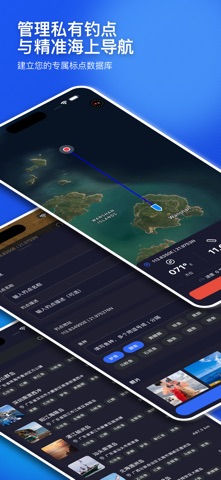

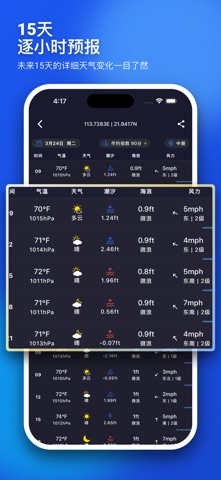

iPad screenshots


Icon palette
About this app
SunnyFish:你的专业海钓气象与智能钓点工具箱 欢迎使用 SunnyFish,这是一款专为中国海钓爱好者、船长、赶海人群及水上运动玩家量身定制的海洋气象工具箱。不论你是去近海矶钓、远洋船钓、还是周末带家人去海边赶海,掌握精准的海洋天气和潮水变化是安全与丰收的前提。SunnyFish 深度聚合了 NOAA、ECMWF、DWD 等全球顶尖气象机构的数据模型,为你提供精确到小时的海洋预报。 我们深知,海钓不仅是一门手艺,更是一门科学。为此,SunnyFish 独创了“海钓指数模型”,通过综合分析风力、海浪、潮汐、能见度、水温、气压这六大核心环境因子,智能推算出每天的“最佳咬钩时段”,让你精准把握鱼情。不仅如此,SunnyFish 还是你的私人钓点管家,支持一键保存秘密钓点(标点),并在茫茫大海上为你提供精准的船舶导航。 拒绝盲目出海,告别“空军打龟”!让 SunnyFish 成为你手机里的虚拟船长,助你每一次出航都能安全返航,盆满钵满! 【高精度海洋天气预报】 1. 顶级气象模型:独家集成 NOAA、ECMWF 等权威气象数据,数据精准度远超普通天气软件,专为海洋环境优化。 2. 详…
App details
What you can learn from SunnyFish:专业海钓工具箱
Every shipping app on the App Store has gone through the same decisions you're working through right now: which screenshot goes first, what caption sits over it, which device frame to show, what color the background should be. The 13 screenshots above are SunnyFish:专业海钓工具箱's answers to those questions — they're public, they're real, and they made it through Apple's review.
What the numbers say: SunnyFish:专业海钓工具箱 runs a dark set where the background shifts from screenshot to screenshot (first shot #1C54EC) — each image has to stand on its own, so the captions carry more of the story. The accent colour we picked up, #E48C44, is the one to reuse for badges, arrows and highlighted words if you borrow this look. Hit Use this style to open the editor with these exact colours and drop your own screenshot in.
Notice the first screenshot in particular. It's the one users see in search results and on the product page, and it's where most apps spend their best caption and tightest design. Look at the proportion of background to phone, where the text sits, what one thing the image is trying to communicate.
Want to see how other Weather apps approach the same problem? Browse more Weather apps in the showcase.
Take what works into your own screenshots
Open LaunchShots and design your App Store & Google Play screenshots — pick a device frame, drop captions, ship in minutes. Free, in your browser.
Open the screenshot editor →Apps with a similar look
Closest background + accent colours among the listings we've analysed — useful when you want to see the same palette handled by a different team.