Chart position — tracked daily by LaunchShots
Screenshot changes — detected by LaunchShots
Screenshot style breakdown
Sampled from 6 of DayCity - 世界時計と天気の箱庭ウィジェット's App Store screenshots — background, accent and theme, measured by LaunchShots (not something Apple publishes).
#040404 bg
#272727
#3C84F4 accent
#FFFFFF text
Reading the caption text from the screenshots in your browser…
Screenshots


iPad screenshots


Icon palette
About this app
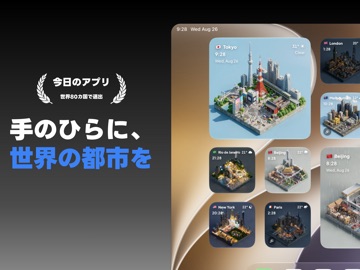
手のひらに、世界の都市を。 DayCityは、世界の「今」をアートとして楽しむ天気時計アプリです。 お気に入りの都市をホーム画面に飾れば、そこはあなただけの箱庭。現地の天気や時間に合わせて、街の表情が刻々と変化します。 仕事の合間にふと眺めるパリの夕暮れ、朝起きて確認するニューヨークの雨。 毎日生まれ変わる景色で、あなたのiPhoneを豊かに彩りませんか? 【主な機能】 ■ 世界中の都市をウィジェットに 厳選された世界の都市をラインナップ。 現地の天気と時間を反映した、美しいアイソメトリック(箱庭風)アートをホーム画面に配置できます。 ■ 言葉で作る、あなただけの街「クラフト」 好きなテーマや言葉を入力して、世界に一つだけの箱庭を生み出せます。 さらに「現在地」とリンクさせれば、あなたのいる場所の天気や時間に合わせて景色が変化。見慣れた日常が、特別なアート空間に生まれ変わります。 ■ 毎日が新しい、AI生成アート 晴れ、雨、雪。朝、昼、夕方、夜。1時間ごとに現地の空気を切り取ります。 画像はAIによって毎日生成されるた…
App details
What you can learn from DayCity - 世界時計と天気の箱庭ウィジェット
Every shipping app on the App Store has gone through the same decisions you're working through right now: which screenshot goes first, what caption sits over it, which device frame to show, what color the background should be. The 12 screenshots above are DayCity - 世界時計と天気の箱庭ウィジェット's answers to those questions — they're public, they're real, and they made it through Apple's review.
What the numbers say: DayCity - 世界時計と天気の箱庭ウィジェット runs a mixed light-and-dark set where the background shifts from screenshot to screenshot (first shot #040404) — each image has to stand on its own, so the captions carry more of the story. The accent colour we picked up, #3C84F4, is the one to reuse for badges, arrows and highlighted words if you borrow this look. Hit Use this style to open the editor with these exact colours and drop your own screenshot in.
Notice the first screenshot in particular. It's the one users see in search results and on the product page, and it's where most apps spend their best caption and tightest design. Look at the proportion of background to phone, where the text sits, what one thing the image is trying to communicate.
Want to see how other Travel apps approach the same problem? Browse more Travel apps in the showcase.
Take what works into your own screenshots
Open LaunchShots and design your App Store & Google Play screenshots — pick a device frame, drop captions, ship in minutes. Free, in your browser.
Open the screenshot editor →Apps with a similar look
Closest background + accent colours among the listings we've analysed — useful when you want to see the same palette handled by a different team.