Screenshot changes — detected by LaunchShots
Screenshot style breakdown
Sampled from 5 of Beat Blocks's App Store screenshots — background, accent and theme, measured by LaunchShots (not something Apple publishes).
#FC9404 bg
#DD8203
#64ACFC accent
#111111 text
Screenshots



iPad screenshots


Icon palette
About this app
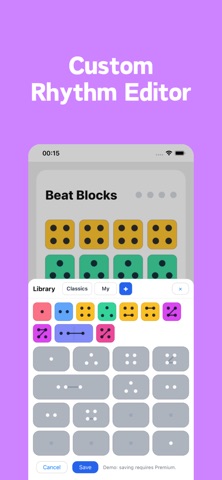
Beat Blocks is an interactive rhythm practice app built for players at every level. See the beat, build your own patterns, play along, and strengthen your timing with multiple ways to visualize rhythm. 4 Unique Visualization Modes: - Beat Blocks Mode: The signature dot-grid view. Notes and rests become clear geometric blocks, making rhythm structure easy to see and feel. - Circles Mode: Each beat becomes a colorful circle divided into slices for its subdivisions, then lights up in time as the rhythm plays. - Staff Mode: Practice with standard musical notation and connect your rhythm training to real-world sight-reading. - Jianpu (Numbered) Mode: A clean numbered-notation view for players who prefer Jianpu. Key Features: - Custom Rhythm Editor: Build and save your own rhythms in 4/4, 3/4, and 6/8. Create eighth-note patterns, triplets, dotted rhythms, syncopations, rests, and multi-m…
App details
What you can learn from Beat Blocks
Every shipping app on the App Store has gone through the same decisions you're working through right now: which screenshot goes first, what caption sits over it, which device frame to show, what color the background should be. The 8 screenshots above are Beat Blocks's answers to those questions — they're public, they're real, and they made it through Apple's review.
What the numbers say: Beat Blocks runs a light set where the background shifts from screenshot to screenshot (first shot #FC9404) — each image has to stand on its own, so the captions carry more of the story. The accent colour we picked up, #64ACFC, is the one to reuse for badges, arrows and highlighted words if you borrow this look. Hit Use this style to open the editor with these exact colours and drop your own screenshot in.
Notice the first screenshot in particular. It's the one users see in search results and on the product page, and it's where most apps spend their best caption and tightest design. Look at the proportion of background to phone, where the text sits, what one thing the image is trying to communicate.
Want to see how other Music apps approach the same problem? Browse more Music apps in the showcase.
Take what works into your own screenshots
Open LaunchShots and design your App Store & Google Play screenshots — pick a device frame, drop captions, ship in minutes. Free, in your browser.
Open the screenshot editor →Apps with a similar look
Closest background + accent colours among the listings we've analysed — useful when you want to see the same palette handled by a different team.