Screenshot changes — detected by LaunchShots
Screenshot style breakdown
Sampled from 4 of Any Planner: タスク管理・ToDoリスト's App Store screenshots — background, accent and theme, measured by LaunchShots (not something Apple publishes).
#F4F4FC bg
#D6D6DD
#E4FC1C accent
#111111 text
Reading the caption text from the screenshots in your browser…
Screenshots

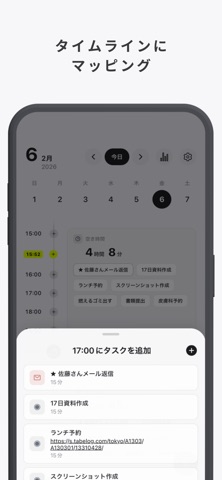
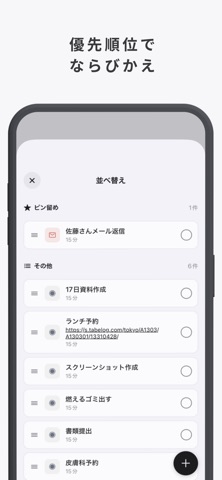
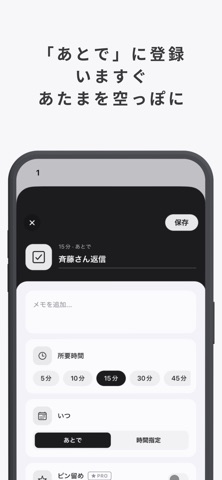
iPad screenshots

Icon palette
About this app
Any Plannerは、1日のToDo・予定・習慣をタイムラインで可視化するタスク管理アプリです。 「やることが多すぎて動けない」 「気づいたら時間が過ぎていた」 「ToDoリストが続かない」 ——そんな悩みを、シンプルな時間軸表示で解決します。 ADHD特性のある方の「先延ばし」「忘れ物」「時間感覚のズレ」にも寄り添う設計。勉強・仕事・家事のスケジュールをタイムラインで整理し、毎日をスッキリ過ごせます。 ▼ こんな方におすすめ ・タスク管理・ToDoリストが続かない方 ・ADHDで時間管理が苦手な方 ・大学生・社会人で時間割や予定を整理したい方 ・勉強アプリや習慣化アプリを探している方 ・リマインダーや手帳アプリでは物足りない方 ・先延ばし癖を直したい方 ▼ Any Plannerの特徴 ■ タイムライン表示 タスクを時間軸に並べて、1日の流れをひと目で把握。「今やるべきこと」が一目瞭然です。空き時間も可視化されるので、時間の使い方が自然と整います。 ■ あとでやるリスト 今すぐやらないタスクは「あとで」に保管。空き時間にできるタスクを自動で提…
App details
What you can learn from Any Planner: タスク管理・ToDoリスト
Every shipping app on the App Store has gone through the same decisions you're working through right now: which screenshot goes first, what caption sits over it, which device frame to show, what color the background should be. The 5 screenshots above are Any Planner: タスク管理・ToDoリスト's answers to those questions — they're public, they're real, and they made it through Apple's review.
What the numbers say: Any Planner: タスク管理・ToDoリスト runs a light set with one background colour (#F4F4FC) carried across every screenshot — the listing reads as a single poster when the shots sit side by side in search results. The accent colour we picked up, #E4FC1C, is the one to reuse for badges, arrows and highlighted words if you borrow this look. Hit Use this style to open the editor with these exact colours and drop your own screenshot in.
Notice the first screenshot in particular. It's the one users see in search results and on the product page, and it's where most apps spend their best caption and tightest design. Look at the proportion of background to phone, where the text sits, what one thing the image is trying to communicate.
Want to see how other Productivity apps approach the same problem? Browse more Productivity apps in the showcase.
Take what works into your own screenshots
Open LaunchShots and design your App Store & Google Play screenshots — pick a device frame, drop captions, ship in minutes. Free, in your browser.
Open the screenshot editor →Apps with a similar look
Closest background + accent colours among the listings we've analysed — useful when you want to see the same palette handled by a different team.