Chart position — tracked daily by LaunchShots
Screenshot style breakdown
Sampled from 6 of GitSync.md: Gitクライアント's App Store screenshots — background, accent and theme, measured by LaunchShots (not something Apple publishes).
#141414 bg
#343434
#2C5CFC accent
#FFFFFF text
Reading the caption text from the screenshots in your browser…
Screenshots

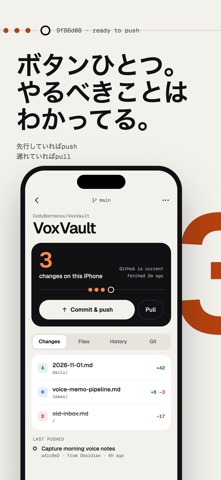


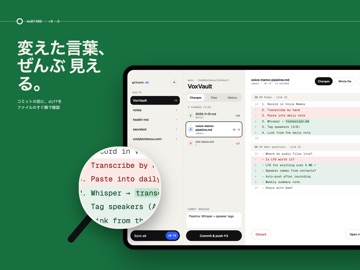
iPad screenshots



Icon palette
About this app
GitSync.mdはiPhoneとiPad向けのGitクライアントです。Markdownノートやコードを本物のGitリポジトリで管理し、ファイルを編集して変更を確認し、コミット・プッシュできます。 内蔵エディタを使うほか、リポジトリのファイルをObsidian、iA Writer、1Writer、Taioなど、iOSの「ファイル」に対応するアプリで開けます。ノートは本物のGit作業コピー内の通常のファイルとして保存されます。 GitHubにはOAuthまたはPersonal Access Tokenでサインイン。GitLab、Bitbucket、Giteaや自分のGitサーバーにも、必要な認証情報を使ってHTTPSまたはSSHで接続できます。 変更されたファイルとテキストの差分を確認し、変更をステージしてコミットメッセージを書き、リモートにプッシュ。コミット履歴やブランチの管理、stashによる一時退避、Pull with Rebase、マージ競合の確認と解決にも対応しています。 リポジトリのクローン、既存のローカルGitリポジトリの読み込み、対応するローカルフォルダからのGitリポジトリ作成が可能です。フォルダの公開は別の操作で新しい非…
App details
What you can learn from GitSync.md: Gitクライアント
Every shipping app on the App Store has gone through the same decisions you're working through right now: which screenshot goes first, what caption sits over it, which device frame to show, what color the background should be. The 13 screenshots above are GitSync.md: Gitクライアント's answers to those questions — they're public, they're real, and they made it through Apple's review.
What the numbers say: GitSync.md: Gitクライアント runs a mixed light-and-dark set where the background shifts from screenshot to screenshot (first shot #141414) — each image has to stand on its own, so the captions carry more of the story. The accent colour we picked up, #2C5CFC, is the one to reuse for badges, arrows and highlighted words if you borrow this look. Hit Use this style to open the editor with these exact colours and drop your own screenshot in.
Notice the first screenshot in particular. It's the one users see in search results and on the product page, and it's where most apps spend their best caption and tightest design. Look at the proportion of background to phone, where the text sits, what one thing the image is trying to communicate.
Want to see how other Developer Tools apps approach the same problem? Browse more Developer Tools apps in the showcase.
Take what works into your own screenshots
Open LaunchShots and design your App Store & Google Play screenshots — pick a device frame, drop captions, ship in minutes. Free, in your browser.
Open the screenshot editor →Apps with a similar look
Closest background + accent colours among the listings we've analysed — useful when you want to see the same palette handled by a different team.