Chart position — tracked daily by LaunchShots
Screenshot changes — detected by LaunchShots
Screenshot style breakdown
Sampled from 5 of HTML クリエイター : 編集者と閲覧者's App Store screenshots — background, accent and theme, measured by LaunchShots (not something Apple publishes).
#FC6C04 bg
#FC8027
#6C340C accent
#FFFFFF text
Screenshots


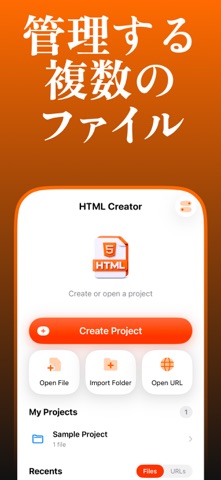
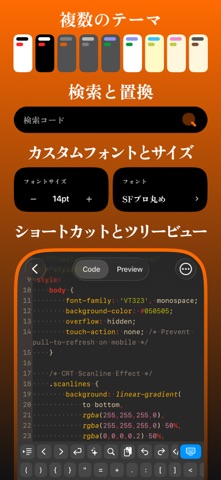
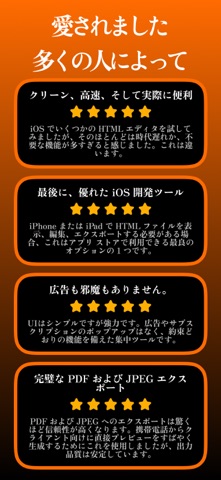
iPad screenshots


Icon palette
About this app
HTML Viewer & Editor は、iPhone と iPad 向けの高速で軽量な HTML エディタです。外出先でも信頼性の高い Web 開発ツールを必要とする開発者のために特別に開発されました。 強力な WebKit Web ビューエンジンを搭載し、HTML をリアルタイムで記述、編集、プレビューできます。コードとプレビューを瞬時に切り替えて、アプリを離れることなくレイアウト、構造、マークアップをテストできます。 主な機能 - ライブ HTML プレビュー - 内蔵 Web ビューアー - 構文ハイライト機能付きコードエディタ - 自動インデント - ダークテーマとライトテーマ - 複数のエディタテーマ - 複数ファイルの保存と管理 - 行番号表示 - 検索と置換 - カスタムフォントと調整可能なテキストサイズ - ツリービュー - HTML ファイルの作成、表示、管理 - 誰でも無料でご利用いただけます ポータブルな HTML エディタと Web プレビューツールを必要とするフロントエンド開発者、Web デザイナー、学生に最適です。 広告なし、サブスクリプションなし、煩わしさなし。 iOS と iPadOS 向…
App details
What you can learn from HTML クリエイター : 編集者と閲覧者
Every shipping app on the App Store has gone through the same decisions you're working through right now: which screenshot goes first, what caption sits over it, which device frame to show, what color the background should be. The 10 screenshots above are HTML クリエイター : 編集者と閲覧者's answers to those questions — they're public, they're real, and they made it through Apple's review.
What the numbers say: HTML クリエイター : 編集者と閲覧者 runs a mixed light-and-dark set where the background shifts from screenshot to screenshot (first shot #FC6C04) — each image has to stand on its own, so the captions carry more of the story. The accent colour we picked up, #6C340C, is the one to reuse for badges, arrows and highlighted words if you borrow this look. Hit Use this style to open the editor with these exact colours and drop your own screenshot in.
Notice the first screenshot in particular. It's the one users see in search results and on the product page, and it's where most apps spend their best caption and tightest design. Look at the proportion of background to phone, where the text sits, what one thing the image is trying to communicate.
Want to see how other Developer Tools apps approach the same problem? Browse more Developer Tools apps in the showcase.
Take what works into your own screenshots
Open LaunchShots and design your App Store & Google Play screenshots — pick a device frame, drop captions, ship in minutes. Free, in your browser.
Open the screenshot editor →Apps with a similar look
Closest background + accent colours among the listings we've analysed — useful when you want to see the same palette handled by a different team.