Chart position — tracked daily by LaunchShots
Screenshot style breakdown
Sampled from 4 of 証明写真 · パスポート写真's App Store screenshots — background, accent and theme, measured by LaunchShots (not something Apple publishes).
#FCFCFC bg
#DDDDDD
#F4B49C accent
#111111 text
Screenshots


Icon palette
About this app
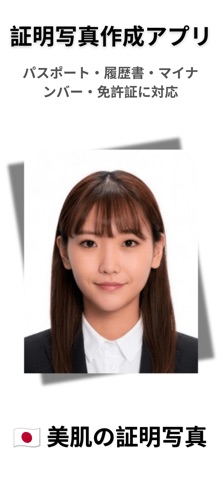
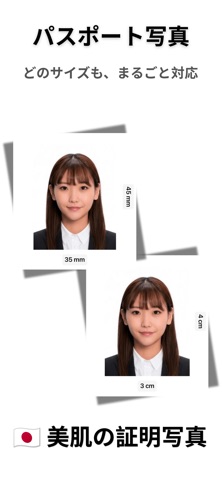
証明写真機で1,000円以上払っていませんか?このアプリなら、AIがわずか数秒でパスポート・マイナンバーカード・運転免許証・履歴書の証明写真を自動作成。赤ちゃん・新生児にも完全対応し、L判レイアウトでコンビニ印刷すれば、たった30円で完成します。 「証明写真アプリ - パスポート・マイナンバー・美肌加工」は、最先端のAIを使用して、瞬時のトリミング、背景透過、美肌補正、フォーマルな服装への着せ替え(お子様にも対応)を行います。スピード写真の高額な料金や長い待ち時間とはもうお別れです。 ユーザーに愛される理由 超高速!AI背景透過と変更 無地の壁は必要ありません。高精度AIが複雑な背景を瞬時に消去します。7つの公式プリセット(純白、水色、スカイブルー、紺色、深紅、明るい赤、グレー)から選択するか、好きなカスタムカラーを指定できます。 AIバーチャルワードローブ – 50種類以上のリアルな衣装 大人用のプロフェッショナルなスーツ、シャツ、ドレスを瞬時に追加。男性用(20着)、女性用(20着)、子供用(10着)をご用意しており…
App details
What you can learn from 証明写真 · パスポート写真
Every shipping app on the App Store has gone through the same decisions you're working through right now: which screenshot goes first, what caption sits over it, which device frame to show, what color the background should be. The 4 screenshots above are 証明写真 · パスポート写真's answers to those questions — they're public, they're real, and they made it through Apple's review.
What the numbers say: 証明写真 · パスポート写真 runs a light set with one background colour (#FCFCFC) carried across every screenshot — the listing reads as a single poster when the shots sit side by side in search results. The accent colour we picked up, #F4B49C, is the one to reuse for badges, arrows and highlighted words if you borrow this look. Hit Use this style to open the editor with these exact colours and drop your own screenshot in.
Notice the first screenshot in particular. It's the one users see in search results and on the product page, and it's where most apps spend their best caption and tightest design. Look at the proportion of background to phone, where the text sits, what one thing the image is trying to communicate.
Want to see how other Photo & Video apps approach the same problem? Browse more Photo & Video apps in the showcase.
Take what works into your own screenshots
Open LaunchShots and design your App Store & Google Play screenshots — pick a device frame, drop captions, ship in minutes. Free, in your browser.
Open the screenshot editor →Apps with a similar look
Closest background + accent colours among the listings we've analysed — useful when you want to see the same palette handled by a different team.