Chart position — tracked daily by LaunchShots
Screenshot style breakdown
Sampled from 3 of SolanaWalk-ソラナウォーク's App Store screenshots — background, accent and theme, measured by LaunchShots (not something Apple publishes).
#2C144C bg
#493465
#5C7CAC accent
#FFFFFF text
Screenshots
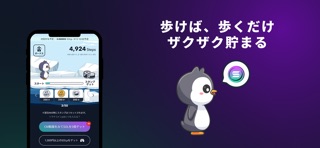


iPad screenshots


Icon palette
About this app
毎日歩くだけでソラナコイン・仮想通貨が無料でもらえる!そしてもっているだけでも毎月ソラナコインが増えるサービス、SOLWalk(ソラナウォーク) また、SOLWalk(ソラナウォーク)で貯めたソラナコインの数や時価額、 レートを常に確認することができます。 ▼SOLWalk(ソラナウォーク)って何? SOLWalkは、毎日歩いた歩数に応じて、無料でソラナコインがもらえるサービスです。 また、毎月保有量に応じてソラナコインがプレゼントでもらうことができます! ※『Apple HealthKit機能』を利用して正確な歩数を取得します。 ▼どうしてソラナコインが無料でもらえるの? SOLWalkでは、広告主様からいただいた広告費の一部をユーザーのみなさまにソラナコインとして還元しています。だから、通常であれば購入しなければ手に入らないソラナコインが無料でもらえるのです! ▼ソラナコインの価格が下がっても大丈夫? ソラナコインは常に価格変動しているので、下がったからと言って焦る必要はありません。むしろそんなときこそSOLWalkでしっかりと貯めて置き、再び価格…
App details
What you can learn from SolanaWalk-ソラナウォーク
Every shipping app on the App Store has gone through the same decisions you're working through right now: which screenshot goes first, what caption sits over it, which device frame to show, what color the background should be. The 6 screenshots above are SolanaWalk-ソラナウォーク's answers to those questions — they're public, they're real, and they made it through Apple's review.
What the numbers say: SolanaWalk-ソラナウォーク runs a dark set with one background colour (#2C144C) carried across every screenshot — the listing reads as a single poster when the shots sit side by side in search results. The accent colour we picked up, #5C7CAC, is the one to reuse for badges, arrows and highlighted words if you borrow this look. Hit Use this style to open the editor with these exact colours and drop your own screenshot in.
Notice the first screenshot in particular. It's the one users see in search results and on the product page, and it's where most apps spend their best caption and tightest design. Look at the proportion of background to phone, where the text sits, what one thing the image is trying to communicate.
Want to see how other Health & Fitness apps approach the same problem? Browse more Health & Fitness apps in the showcase.
Take what works into your own screenshots
Open LaunchShots and design your App Store & Google Play screenshots — pick a device frame, drop captions, ship in minutes. Free, in your browser.
Open the screenshot editor →Apps with a similar look
Closest background + accent colours among the listings we've analysed — useful when you want to see the same palette handled by a different team.