Chart position — tracked daily by LaunchShots
Screenshot changes — detected by LaunchShots
Screenshot style breakdown
Sampled from 6 of الرقية الشاملة والمصحف الشريف's App Store screenshots — background, accent and theme, measured by LaunchShots (not something Apple publishes).
#044C4C bg
#276565
#D4AC34 accent
#FFFFFF text
Screenshots



iPad screenshots


Icon palette
About this app
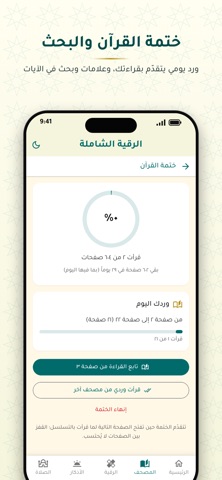
«الرقية الشاملة» تطبيق يجمع المصحف الشريف والرقية الشرعية والأذكار ومواقيت الصلاة في مكان واحد، بلا إعلانات وبلا حساب. ورقية التعطيل فيه لفضيلة الشيخ فهد القرني. ما يوفره التطبيق: • المصحف الشريف: مصحف المدينة كاملاً (٦٠٤ صفحات) برسم مجمع الملك فهد، بلا إنترنت، مع فهرس السور والأجزاء والبحث في الآيات. • الختمة والورد اليومي: اختر مدة ختمتك ويحسب لك التطبيق ورد اليوم، مع علامات مرجعية للعودة إلى مكانك. • الرقية الشرعية الصوتية: استماع إلى رقية التعطيل والسحر بصوت الشيخ فهد القرني ومشايخ آخرين. • الرقية المكتوبة: قراءة آيات الرقية من سور القرآن الكريم مع إمكانية تكبير الخط، ورقى حسب الحالة وضوابط الرقية الشرعية. • الأذكار: أذكار الصباح والمساء وأذكار بعد الصلاة من حصن المسلم، وعداد التسبيح، وتذكير بسورة الكهف يوم الجمعة. • مواقيت الصلاة واتجاه القبلة بلا إنترنت، مع تنبيه عند دخول كل وقت. • برنامج المداومة لمتابعة وردك اليومي وسلسلة أيامك. • ودجتات للشاشة الرئيسية وشاشة القفل (آيفون): الص…
App details
What you can learn from الرقية الشاملة والمصحف الشريف
Every shipping app on the App Store has gone through the same decisions you're working through right now: which screenshot goes first, what caption sits over it, which device frame to show, what color the background should be. The 14 screenshots above are الرقية الشاملة والمصحف الشريف's answers to those questions — they're public, they're real, and they made it through Apple's review.
What the numbers say: الرقية الشاملة والمصحف الشريف runs a mixed light-and-dark set where the background shifts from screenshot to screenshot (first shot #044C4C) — each image has to stand on its own, so the captions carry more of the story. The accent colour we picked up, #D4AC34, is the one to reuse for badges, arrows and highlighted words if you borrow this look. Hit Use this style to open the editor with these exact colours and drop your own screenshot in.
Notice the first screenshot in particular. It's the one users see in search results and on the product page, and it's where most apps spend their best caption and tightest design. Look at the proportion of background to phone, where the text sits, what one thing the image is trying to communicate.
Want to see how other Book apps approach the same problem? Browse more Book apps in the showcase.
Take what works into your own screenshots
Open LaunchShots and design your App Store & Google Play screenshots — pick a device frame, drop captions, ship in minutes. Free, in your browser.
Open the screenshot editor →Apps with a similar look
Closest background + accent colours among the listings we've analysed — useful when you want to see the same palette handled by a different team.